> ## Documentation Index
> Fetch the complete documentation index at: https://docs.reservesense.com/llms.txt
> Use this file to discover all available pages before exploring further.
# Variables
> Learn how to insert and configure variables so Reserve Sense fills report templates with the correct property, organization, date, and model data.
Variables insert information already stored in Reserve Sense into template text. This includes property details, dates, funding model results, and organization information. When a report is built, Reserve Sense replaces each variable with the value for that report, so the template does not need to be rewritten.
## Insert a variable
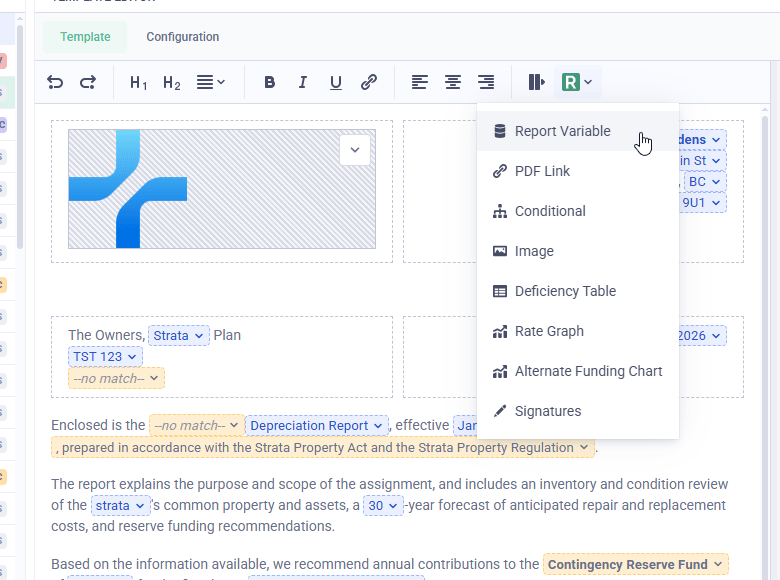
Place the cursor where the value should appear. Open the Reserve Sense menu using the R button in the editor toolbar, then choose **Report Variable**.
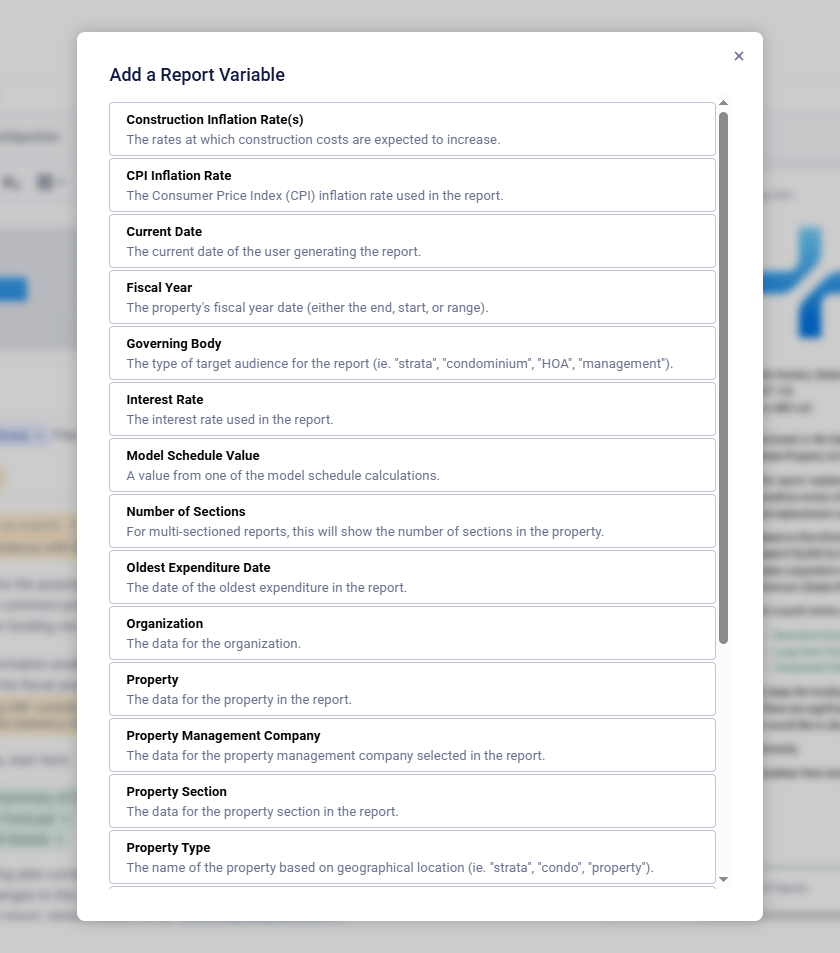
The **Add a Report Variable** dialog lists the data available to the template. Select a variable, then choose the value and format it should use.
## Configure and format a variable
An inserted variable appears as a blue control in the editor. Open its dropdown to change its options or remove it. The available options depend on the variable. For example:
* **Current Date** lets you choose a date format and year offset
* **Property** lets you choose a property field, such as its name or address
* **Model Schedule Value** lets you choose a funding-model value and year
Variables can also use property-section data when needed. See [Sectioned reports](/report-templates/sectioned-reports) for the section-specific settings and examples.
Variables can be formatted like ordinary text, including bold and italic. When the PDF is built, Reserve Sense replaces the blue control with the value for that report.
## Example: Build a recommendation sentence
Combining **Model Schedule Value** and **Fiscal Year** can produce a sentence such as:
When the report is built, those controls resolve into the finished sentence:
> We recommend you contribute \$6,000 in the August 2025–July 2026 fiscal year, which represents an average of \$9 per month per unit more than the previous year.
Reserve Sense inserts the contribution, fiscal-year range, and monthly increase for the report being built.
## Variable reference
The table lists the top-level choices in **Add a Report Variable**. Selecting one opens its available fields and formatting options.
| Variable | Description |
| ---------------------------------- | -------------------------------------------------------------------------------------------------------------------------------------------------------------------------------------------- |
| **Construction Inflation Rate(s)** | Expected annual increases in construction costs. |
| **CPI Inflation Rate** | The Consumer Price Index inflation rate used in the report. |
| **Current Date** | The date the report is generated. Choose a date format and use **Year Offset** to show an earlier or later year. |
| **Fiscal Year** | The property’s fiscal-year start, end, or range, with an optional year offset. |
| **Governing Body** | The report’s target audience, such as “strata,” “condominium,” “HOA,” or “management.” |
| **Interest Rate** | The interest rate used in the report. |
| **Model Schedule Value** | A calculated or entered funding-model value, such as a contribution, balance, deficiency, or per-unit amount. Choose the value and year; **Recommended** is currently the only Model option. |
| **Number of Sections** | The number of property sections in the report. |
| **Oldest Expenditure Date** | The earliest expenditure date in the report. |
| **Organization** | Organization details such as its name, email, phone, slogan, and website. |
| **Property** | Property details such as its name, address, and strata or condominium number. |
| **Property Management Company** | Details for the property management company assigned to the property. |
| **Property Section** | The current property section’s name, number of units, or operating budget. It can also format values for all property sections. |
| **Property Type** | The localized name of the property, such as “strata,” “condo,” or “property.” |
| **Province Act** | The name of the provincial act governing the report. |
| **Province Regulation** | The name of the provincial regulation governing the report. |
| **Report** | Report details such as its Class of Study, Effective Date, Report ID, Site Inspection Date, and Study Period. |
| **Report Type** | The localized report name, such as “depreciation report” or “reserve fund study.” |
| **Signatories** | The report writers assigned as signatories, with options for credentials and inspectors. |
| **Update Period** | The recommended interval between report updates, written as a word such as “five.” |
Use [conditionals](/report-templates/conditionals) when more than a single term needs to change, such as a full sentence or paragraph that differs by province.
If you need data that is not available as a variable, [contact us](mailto:info@reservesense.com).
Next: [Change wording automatically with conditionals →](/report-templates/conditionals)
 The **Add a Report Variable** dialog lists the data available to the template. Select a variable, then choose the value and format it should use.
 ## Configure and format a variable
An inserted variable appears as a blue control in the editor. Open its dropdown to change its options or remove it. The available options depend on the variable. For example:
* **Current Date** lets you choose a date format and year offset
* **Property** lets you choose a property field, such as its name or address
* **Model Schedule Value** lets you choose a funding-model value and year
Variables can also use property-section data when needed. See [Sectioned reports](/report-templates/sectioned-reports) for the section-specific settings and examples.
Variables can be formatted like ordinary text, including bold and italic. When the PDF is built, Reserve Sense replaces the blue control with the value for that report.
## Example: Build a recommendation sentence
Combining **Model Schedule Value** and **Fiscal Year** can produce a sentence such as:
## Configure and format a variable
An inserted variable appears as a blue control in the editor. Open its dropdown to change its options or remove it. The available options depend on the variable. For example:
* **Current Date** lets you choose a date format and year offset
* **Property** lets you choose a property field, such as its name or address
* **Model Schedule Value** lets you choose a funding-model value and year
Variables can also use property-section data when needed. See [Sectioned reports](/report-templates/sectioned-reports) for the section-specific settings and examples.
Variables can be formatted like ordinary text, including bold and italic. When the PDF is built, Reserve Sense replaces the blue control with the value for that report.
## Example: Build a recommendation sentence
Combining **Model Schedule Value** and **Fiscal Year** can produce a sentence such as:
 When the report is built, those controls resolve into the finished sentence:
> We recommend you contribute \$6,000 in the August 2025–July 2026 fiscal year, which represents an average of \$9 per month per unit more than the previous year.
Reserve Sense inserts the contribution, fiscal-year range, and monthly increase for the report being built.
## Variable reference
The table lists the top-level choices in **Add a Report Variable**. Selecting one opens its available fields and formatting options.
| Variable | Description |
| ---------------------------------- | -------------------------------------------------------------------------------------------------------------------------------------------------------------------------------------------- |
| **Construction Inflation Rate(s)** | Expected annual increases in construction costs. |
| **CPI Inflation Rate** | The Consumer Price Index inflation rate used in the report. |
| **Current Date** | The date the report is generated. Choose a date format and use **Year Offset** to show an earlier or later year. |
| **Fiscal Year** | The property’s fiscal-year start, end, or range, with an optional year offset. |
| **Governing Body** | The report’s target audience, such as “strata,” “condominium,” “HOA,” or “management.” |
| **Interest Rate** | The interest rate used in the report. |
| **Model Schedule Value** | A calculated or entered funding-model value, such as a contribution, balance, deficiency, or per-unit amount. Choose the value and year; **Recommended** is currently the only Model option. |
| **Number of Sections** | The number of property sections in the report. |
| **Oldest Expenditure Date** | The earliest expenditure date in the report. |
| **Organization** | Organization details such as its name, email, phone, slogan, and website. |
| **Property** | Property details such as its name, address, and strata or condominium number. |
| **Property Management Company** | Details for the property management company assigned to the property. |
| **Property Section** | The current property section’s name, number of units, or operating budget. It can also format values for all property sections. |
| **Property Type** | The localized name of the property, such as “strata,” “condo,” or “property.” |
| **Province Act** | The name of the provincial act governing the report. |
| **Province Regulation** | The name of the provincial regulation governing the report. |
| **Report** | Report details such as its Class of Study, Effective Date, Report ID, Site Inspection Date, and Study Period. |
| **Report Type** | The localized report name, such as “depreciation report” or “reserve fund study.” |
| **Signatories** | The report writers assigned as signatories, with options for credentials and inspectors. |
| **Update Period** | The recommended interval between report updates, written as a word such as “five.” |
Use [conditionals](/report-templates/conditionals) when more than a single term needs to change, such as a full sentence or paragraph that differs by province.
If you need data that is not available as a variable, [contact us](mailto:info@reservesense.com).
Next: [Change wording automatically with conditionals →](/report-templates/conditionals)
When the report is built, those controls resolve into the finished sentence:
> We recommend you contribute \$6,000 in the August 2025–July 2026 fiscal year, which represents an average of \$9 per month per unit more than the previous year.
Reserve Sense inserts the contribution, fiscal-year range, and monthly increase for the report being built.
## Variable reference
The table lists the top-level choices in **Add a Report Variable**. Selecting one opens its available fields and formatting options.
| Variable | Description |
| ---------------------------------- | -------------------------------------------------------------------------------------------------------------------------------------------------------------------------------------------- |
| **Construction Inflation Rate(s)** | Expected annual increases in construction costs. |
| **CPI Inflation Rate** | The Consumer Price Index inflation rate used in the report. |
| **Current Date** | The date the report is generated. Choose a date format and use **Year Offset** to show an earlier or later year. |
| **Fiscal Year** | The property’s fiscal-year start, end, or range, with an optional year offset. |
| **Governing Body** | The report’s target audience, such as “strata,” “condominium,” “HOA,” or “management.” |
| **Interest Rate** | The interest rate used in the report. |
| **Model Schedule Value** | A calculated or entered funding-model value, such as a contribution, balance, deficiency, or per-unit amount. Choose the value and year; **Recommended** is currently the only Model option. |
| **Number of Sections** | The number of property sections in the report. |
| **Oldest Expenditure Date** | The earliest expenditure date in the report. |
| **Organization** | Organization details such as its name, email, phone, slogan, and website. |
| **Property** | Property details such as its name, address, and strata or condominium number. |
| **Property Management Company** | Details for the property management company assigned to the property. |
| **Property Section** | The current property section’s name, number of units, or operating budget. It can also format values for all property sections. |
| **Property Type** | The localized name of the property, such as “strata,” “condo,” or “property.” |
| **Province Act** | The name of the provincial act governing the report. |
| **Province Regulation** | The name of the provincial regulation governing the report. |
| **Report** | Report details such as its Class of Study, Effective Date, Report ID, Site Inspection Date, and Study Period. |
| **Report Type** | The localized report name, such as “depreciation report” or “reserve fund study.” |
| **Signatories** | The report writers assigned as signatories, with options for credentials and inspectors. |
| **Update Period** | The recommended interval between report updates, written as a word such as “five.” |
Use [conditionals](/report-templates/conditionals) when more than a single term needs to change, such as a full sentence or paragraph that differs by province.
If you need data that is not available as a variable, [contact us](mailto:info@reservesense.com).
Next: [Change wording automatically with conditionals →](/report-templates/conditionals)