

October 18, 2026
🎉 New Feature Custom Building Type per sectionEach property section now has a Building Type field that controls how the section is described in your report, such as “Bare Land Strata”. The “Comparable Building Type(s)” you pick for construction inflation stay the same. Leave “Building Type” blank to use a default based on those comparable types. Templates can show it with the “Property Section → Building Type” variable.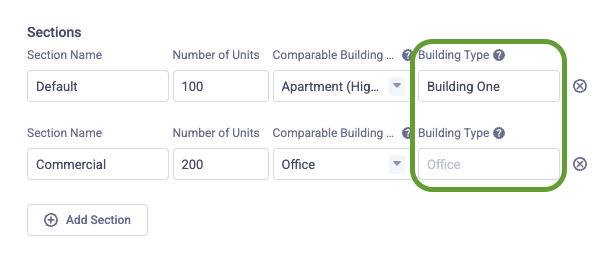
⚡️ EnhancementCover pages now show the property number when the property has one⚡️ EnhancementPDF reports now finish generating about twice as fast⚡️ EnhancementArrow keys now move between various tabs in the application⚡️ EnhancementConnected AI assistants can set a library component’s report path when creating or updating it⚡️ EnhancementThe “Signatures” element in report templates now caps the the width of the signature line and a new “Show Line” menu option can now be used to hide the line entirely⚙ ChangeThe construction cost inflation appendix now labels the Statistics Canada series instead of calling it Building Type🐛 FixedConnecting an AI assistant while signed out now continues to the correct access screen after email sign-in link flow
October 14, 2026
Other Changes
🐛 FixedConnected AI assistants can add costing groups and line items on library component templates➕ AddedConnected AI assistants can add takeoffs to library component templates🐛 FixedConnected AI assistants can reorder components in a report🐛 FixedA Benchmark Analysis table, and other full-page tables and charts, stay in the report when the following page is set to continue on the same page🐛 FixedUnchecking “Start on New Page” on a template page now works more reliably for all page types
October 14, 2026
Other Changes
🐛 FixedChanging a template page’s “Page Type” no longer shows a “must be equal to constant” error, and the new type is saved🐛 FixedChoosing Unset on a property section’s Property Type(s) field now clears every selected type
October 13, 2026
Other Changes
🐛 FixedFixed an issue preventing users from logging in⚡️ EnhancementEntering an RSMeans line code on a costing item now automatically sets the costing source to RSMeans
October 11, 2026
Other Changes
🐛 FixedA site overview photo fills the rest of the page under its heading instead of leaving that heading on a blank page
October 8, 2026
Other Changes
⚡️ Enhancement“Cover”, “Building Plan” and “Site Overview” photos are now uploaded at print quality, so they stay sharp in the PDF without slowing down large reports
October 8, 2026
🎉 New Feature More cover page layoutsTemplate administrators can now choose from a wider range of cover page layouts, each with a short description and a live preview. The Matrix cover has also been refreshed: it now uses two large stacked photos, with the report title and year shown in a box over the photos.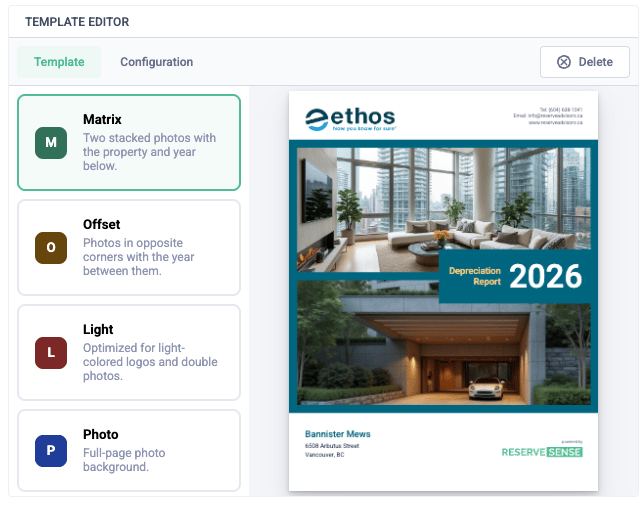
⚡️ EnhancementThe Reserve Fund Plan table labels the current fiscal year and marks the following years as the recommended plan
October 6, 2026
Other Changes
🐛 FixedThe cover page logo field no longer shows an error state when an image is already set🐛 FixedThe Models tab shows a dash for the contribution increase when the previous year’s contributions are under $1
October 4, 2026
🎉 New Feature Organization image uploadsOrganization file uploads now include support for ad-hoc image uploads. You can upload several images, tag them as a wide or square logo, or create your own type (for example a Quebec logo).Those images can now be configured for use on cover page as logos. Existing covers keep using the wide logo.Other Changes➕ AddedQuebec properties can use Carnet, Étude, or Carnet et Étude as the report type. The cover and any template text that uses the report type print the statutory French title.⚡️ EnhancementChanging a report’s “Comparable City (Costing)” now asks whether to update costs on components already in the report.⚙ ChangeAdding a component from the library before a report’s “Comparable City (Costing)” is set now shows a warning.🐛 FixedA signature block that starts at the top of a page now leaves room above the line to sign
October 1, 2026
Other Changes
⚡️ EnhancementWhen editing a component library, entering an RSMeans line number on a costing item now fills in its empty description and default unit from RSMeans (if available)
September 25, 2026
Other Changes
🐛 FixedPDF reports with external images are now displayed correctly in the report template editor preview
September 25, 2026
Other Changes
🐛 FixedAdding and then immediately removing a custom expenditure value no longer crashes the page🐛 FixedConnecting Reserve Sense to ChatGPT no longer fails while refreshing tools🐛 FixedTyping in a report template no longer fails while the first save is still finishing🐛 FixedA one-time expenditure entered on a component’s replacement year now updates the benchmark ideal contribution, including when that component’s current cost is $0
September 22, 2026
Other Changes
⚡️ EnhancementIncreased the limit of AI generated requests per day
September 16, 2026
Other Changes
🐛 FixedCancelling or leaving blank the new-theme name prompt no longer shows an error🐛 FixedWhite Rock, BC properties no longer default to Kamloops costing rates⚡️ EnhancementComponent detail pages in French reports now use French labels for Description, Condition Analysis, Work Completed, and related fields
September 9, 2026
Other Changes
🐛 FixedPressing Enter between aligned or indented paragraphs no longer inserts a blank line in the PDF that other paragraphs do not get➕ AddedConnected AI assistants can add costing groups and line items on custom components through the MCP server⚡️ EnhancementConnected AI assistants now receive a short Reserve Sense product guide when they connect through the MCP server
August 31, 2026
➕ Added MCP Server improvementsAI Assistants can now modify many more areas of the report, including:- Report input settings
- Property section unit counts
- Property details
- Report components
- Component stages
- Takeoff quantities
- Costing matrix lines
- Historical tab financial data
⚡️ EnhancementReports list search now also matches a property’s street address⚡️ EnhancementProperties list search now also matches property number and street address
August 23, 2026
➕ Added Template Variant and Language on InputsEach report can now choose a Template Variant and Language on the Inputs tab. The variant overrides the organization’s default (for example, a Quebec template). Language is English or French.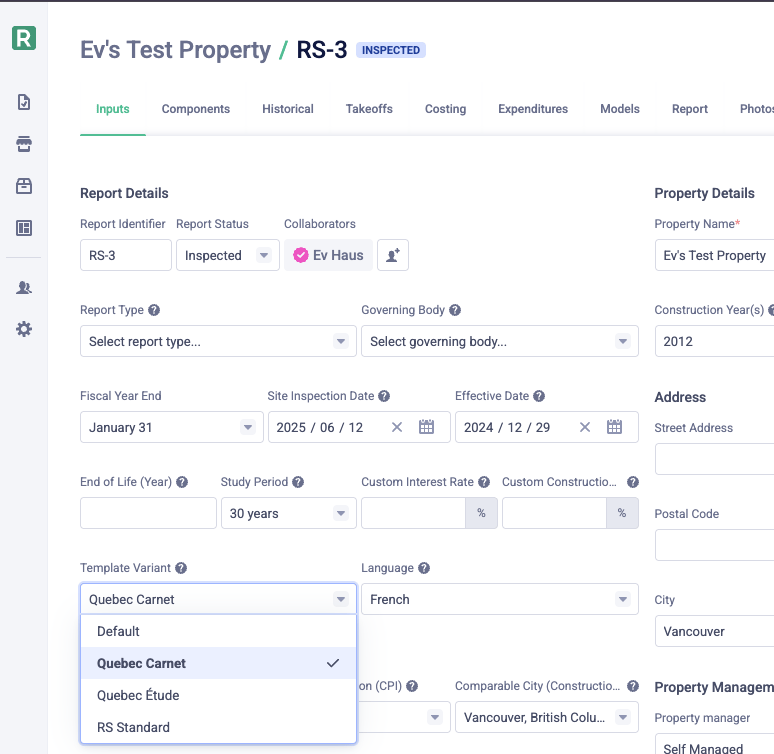
⚡️ Enhancement French language for report tables, charts, and variablesWhen a report Language is set to French on the Inputs tab, system-generated labels in tables and charts now appear in French, along with dates, currency, percentages, and other standard variable text. Wording you write in the template is unchanged.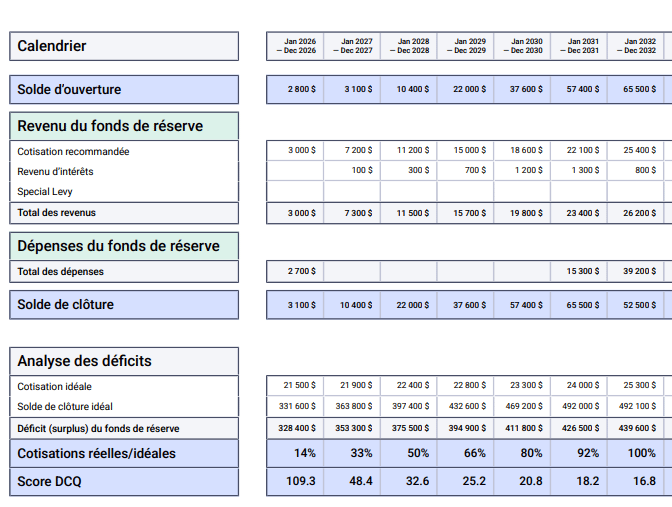
➕ AddedReport templates can now include an “Executive Summary Table” widget⚙ ChangeTemplate variants now have a Default setting instead of an Active toggle🐛 FixedSaving a component stage with no costing fields no longer fails with an unexpected error
August 14, 2026
🎉 New Feature AI text generation for component library fieldsWhen creating a library component, optionally let AI fill Description, Condition Analysis, Scope of Work, When to Act, Potential Deterioration, Suggested Maintenance, and Expected Lifespan. On existing library components, use the new “AI Generate” button on each field to let the AI handle regenerating that field’s text.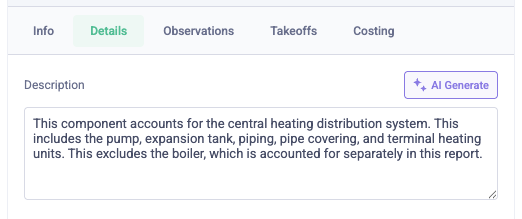
⚡️ Enhancement Resize columns in report templatesDrag the divider between columns to set how wide each column should be. The PDF preview updates to match.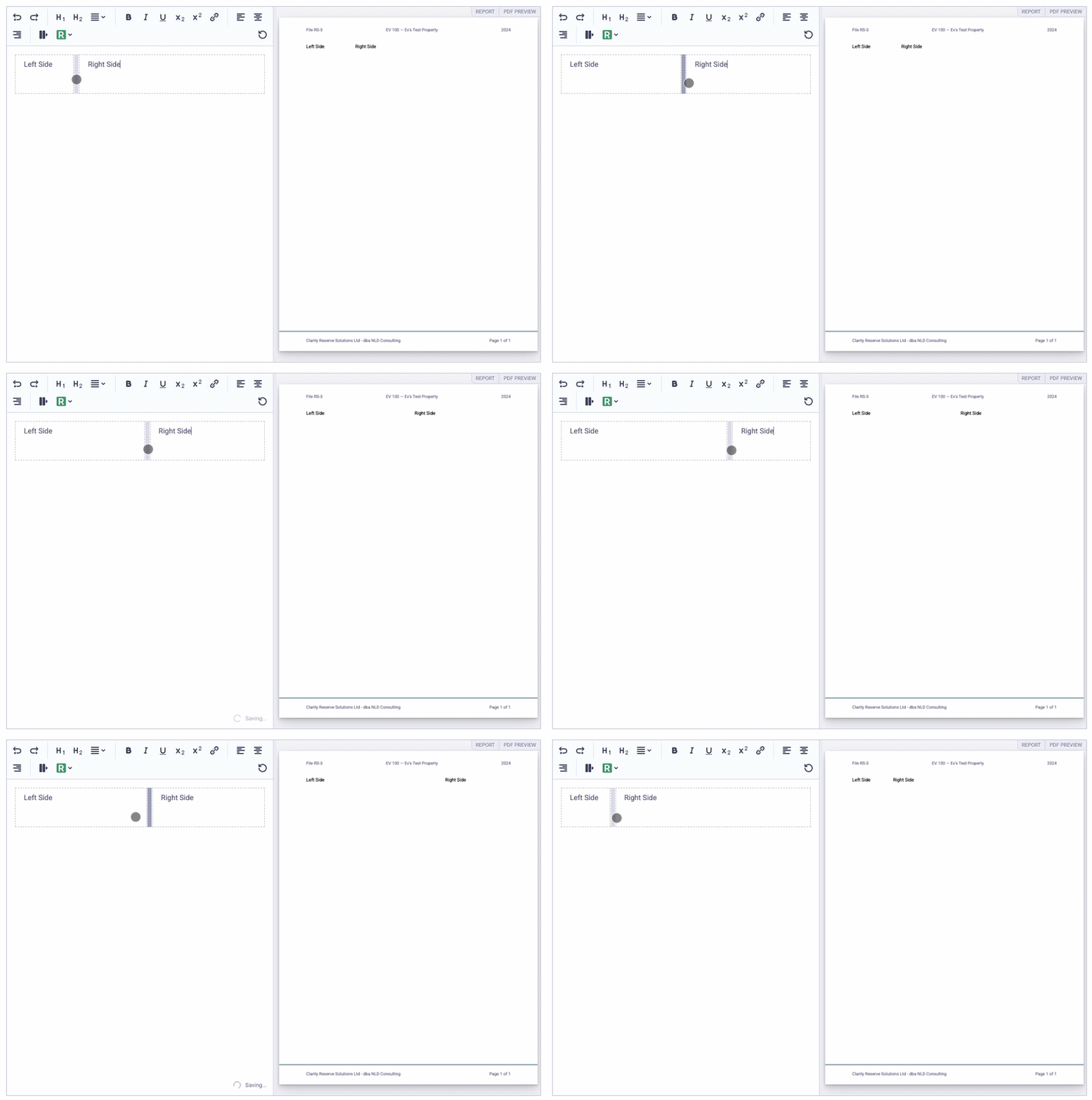
🐛 FixedCover photos converted from iPhone HEIC no longer appear as a blank white area on the report cover➕ AddedSuperscript and subscript formatting in the report template editor toolbar
August 11, 2026
Other Changes
🐛 FixedMinor updates to the default templates created for new organizations
August 11, 2026
Other Changes
⚡️ EnhancementCover photos are no longer compressed on upload, so full-page cover images stay sharper in the PDF
August 10, 2026
Other Changes
⚡️ EnhancementNew organizations now start with the standard Reserve Sense report templates instead of an empty layout🐛 FixedConnected AI assistants that omit a property section id (or pass a report id by mistake) now get a clear required-field error instead of a confusing invalid section message
August 6, 2026
Other Changes
🐛 FixedInserting an image from the Reserve Sense menu in report templates works again⚙ ChangeConnected AI assistants now add report components from the library by default (copying costing and stages), with separate tools for creating library templates or one-off custom report components
August 6, 2026
Other Changes
🐛 FixedBold and underlined text in report templates no longer prevents PDF generation
August 1, 2026
Other Changes
➕ AddedConnected AI assistants can update component stage costing fields (such as custom total) through the MCP server⚙ ChangeChanging a template page from Report to Organization uniqueness (or turning off Sectioned) now warns you and permanently deletes existing report customizations for that page⚡️ EnhancementFiscal year headers and component names stay visible while scrolling the Historical tab🐛 FixedOpening Organization Billing when your organization address is incomplete now asks you to set province/country instead of failing unexpectedly🐛 FixedConnected AI assistants that call update component with no fields to change now get a clear error instead of an unexpected failure🐛 FixedReport template pages with Organization uniqueness now use the organization template in PDFs, even when older report- or section-level overrides still exist
July 29, 2026
Other Changes
🐛 FixedConnected AI assistants can delete report components again without hitting an unexpected error⚡️ EnhancementMicrosoft Copilot Studio can now connect to the Reserve Sense MCP server
July 28, 2026
Other Changes
➕ AddedDeficiency tables in report templates can use a Deficiency Calculation view that shows Ideal Closing Balance − Closing Balance for one section, or a per-section summary table for multi-section properties
July 27, 2026
Other Changes
⚡️ EnhancementPDF links in report templates can now display as the chapter/section name or the page name⚙ ChangeThe Component List table in PDF reports no longer includes one-time expenditures🐛 FixedPDF links to chapter pages (for example “2. Property Information”) now jump to the start of that chapter🐛 FixedInterest Rate and CPI Inflation Rate template variables now include the%symbol, matching Construction Inflation Rate🐛 FixedUploading a building plan photo now shows the Building Plans page in the Report tab without refreshing🐛 FixedBenchmark Analysis no longer breaks when the interest rate equals the CPI inflation rate
July 26, 2026
Other Changes
➕ AddedPercent Funded / DCQ tables in report templates can use Sectioned All or Auto display for multi-section properties⚙ ChangeReport template page uniqueness is now Organization or Report only; use the new “Sectioned” checkbox to duplicate a page for each property section⚡️ EnhancementOrganization and report Models screens warn when BC or SK reports have fewer than three funding models⚡️ EnhancementComparable Rates on a report are now pre-filled from the property city and province when a match is available🐛 FixedOnly models marked “Shown by default” are auto-created for new reports🐛 FixedCreating a new report from a property page no longer crashes before the report opens🐛 FixedDeleting a report from a property page now removes it from the list immediately🐛 FixedDuplicating a report from a property page now adds the copy to the list immediately, including its collaborators🐛 FixedCollaborator names now appear on the property page report list without needing to open a report first
July 26, 2026
Other Changes
⚡️ EnhancementMCP connections now start with read-only access and request additional permissions only when needed⚡️ EnhancementReserve Sense MCP now requires sign-in before listing tools, and only organization admins see component library tools
July 21, 2026
Other Changes
⚡️ EnhancementReserve Sense MCP clients can now list and update your organization’s component library templates, including Quebec maintenance fields
July 21, 2026
Other Changes
🐛 FixedClicking blue report template variable chips opens their options menu again🐛 FixedReport pages with Property Section uniqueness now render once per section in multi-section reports
July 14, 2026
Other Changes
🐛 FixedOpening a report after viewing a different property no longer crashes the app with a missing property section error🐛 FixedTemplate page PDF previews no longer fail after app updates due to a mismatched PDF viewer worker version🐛 FixedDeficiency tables, rate graphs, alternate funding charts, and signatures in report templates no longer lose their styling in PDF previews and generated PDFs⚡️ EnhancementSectioned strata reports now use clearer section labels in model schedule values, construction inflation rates, executive summary headings, and forecast chart titles
July 8, 2026
Other Changes
➕ AddedReport template pages can use a “Show Page Condition” for properties in “Nova Scotia” or “Newfoundland and Labrador”⚡️ EnhancementThe “Current Date” template variable now supports a year offset for creating dates for “in 10 years” or “2 years ago”
July 7, 2026
Other Changes
🐛 FixedConstruction inflation charts in PDF reports no longer repeat years on the x-axis when a property section includes multiple building types
July 7, 2026
🎉 New Feature Report template variantsOrganizations can now maintain multiple report template variants for Report Templates. Each variant is a full set of pages, chapters, and appendixes. The “Default” variant is always available and cannot be renamed or deleted. Use Add New Template Variant to start from a blank layout or duplicate an existing variant, then edit each variant’s structure and template content independently. When variants are activated, they become the new template set for all reports in the organization.Variants can be used for creating completely different report templates (eg. to handle different regional reporting requirements or to provide support for different languages).Additionally, the “Report Templates” section has been consolidated into a single section with both page “Template” and “Configuration” under a single view. The page lister can be collapsed to create more space for editing the selected template.Other Changes➕ AddedQuebec Carnet d’Entretien fields for “Maintenance Program” and “Maintenance History”, plus a new “When to Act” field⚙ ChangeOrganization theme settings moved from Report Templates to Organization → Themes⚡️ EnhancementTemplate page PDF previews show whether content comes from your organization, report, or property section template⚡️ EnhancementComponent detail tabs are now organized as “Details” and “Observations”, with “Scope of Work” on the “Details” tab⚡️ EnhancementEmpty component text fields are no longer shown in PDF reports🐛 FixedResetting a customized report page template now removes your report-specific changes and shows the organization default again; editing an inherited page now creates a report override instead of changing the organization template
June 24, 2026
Other Changes
🐛 FixedComponent page index tables in PDF reports now show correct page numbers when a component spans more than one page🐛 FixedConnected AI assistants now always operate on the organization you authorized, ensuring reports and components from another organization can never be returned
June 24, 2026
Other Changes
🐛 FixedDCQ and Percent Funded tables in the report editor now show values for the current report year instead of the first historical year⚡️ EnhancementAI assistants connecting through MCP now receive clearer guidance on component paths and no longer create extra folders when a report ID is included in the path
June 23, 2026
Other Changes
🐛 FixedConnecting Reserve Sense to ChatGPT no longer fails during OAuth setup before the sign-in screen appears🐛 FixedConnected AI assistants now only list and edit components within a report, not your organization-wide component library🐛 FixedThe Photos tab in the report builder can now be scrolled on smaller screens🐛 FixedClearing a historical expenditure no longer crashes the Historical tab while report data is refetching
June 22, 2026
Other Changes
🐛 FixedImprove reliability of MCP connections to Reserve Sense in ChatGPT and Claude Desktop
June 22, 2026
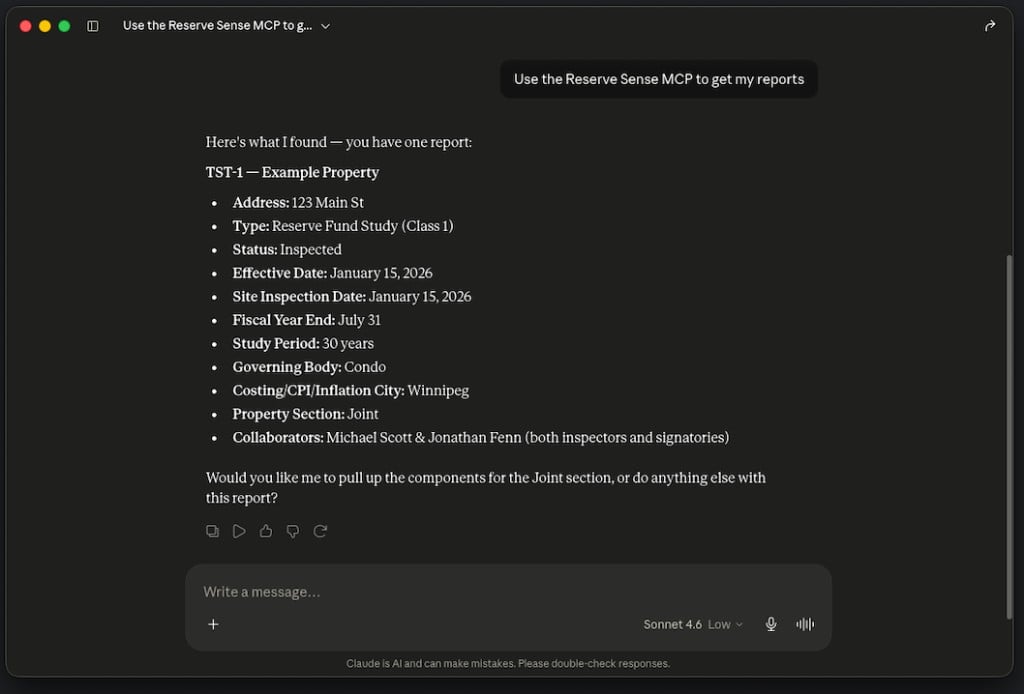
🎉 New Feature Reserve Sense MCP Server
🐛 FixedTemplate Pages PDF preview now reflects your edits as you type instead of showing content customized on a specific report or property section🐛 FixedClicking a conditional in report template pages no longer crashes when one of its branches was left empty after clearing all of its text
June 20, 2026
Other Changes
➕ AddedThe “Model Schedule Value” template variable now includes a “Closing Balance-to-Operating Percentage” option⚡️ EnhancementOntario reserve fund study PDF cover pages now show the report’s class of study (for example, “Class 1”) when one is set⚡️ EnhancementComponent page index tables can now be placed inside chapter and appendix sections in report templates; report-wide table of contents pages stay at the top level of your layout⚡️ EnhancementTable of contents pages support the “Show in Table of Contents” layout option, so you can control whether a table of contents page itself appears in the report table of contents⚡️ EnhancementConditional rules can now compare against Effective Date, Effective Date (Year), End of Life Date, and End of Life (Year) as field values🐛 FixedLeading and trailing spaces in conditional text are no longer removed in report previews and PDFs🐛 FixedConditional branches left blank no longer incorrectly show the Else content when their rule matches⚡️ EnhancementConditional rules now support an is not one of operator for enum fields such as province🐛 FixedStaged components in the Components tab now use the same numbering as Costing (for example, #2a and #2b instead of #2 and #3)🐛 FixedSection numbers in PDF reports now skip pages that are hidden from the table of contents🐛 FixedPDF bookmarks no longer include pages that are hidden from the table of contents🐛 FixedComponent page index tables placed inside an appendix now link to the correct component page numbers🐛 FixedBrief internet connection glitches during deployments are less likely to sign you out of Reserve Sense🐛 FixedSwitching reports from the reports list very quickly no longer causes a crash🐛 FixedClicking a conditional in report template pages no longer throws an error when the matched branch includes chapter headings or other content that depends on the table of contents preview🐛 FixedDeleting an Else If branch in a conditional no longer shows the wrong text on the remaining branches🐛 FixedCompleted reports no longer allow adding components from the library on the Components tab🐛 FixedOpening the Qualifications template page no longer crashes when your preview report has no signatories with professional details configured
June 15, 2026
🎉 New Feature Redesigned conditional logic editor in report templates
Report template conditionals now use a full If / Else If / Else editor, so you can show different text based on property and report data instead of choosing from a fixed list of simple rules. Build conditions from fields like province, report type, units, and property management company; combine multiple criteria in a single branch; and use operators such as is, is one of, and numeric comparisons like > or ≥. Each branch has its own rich text editor, so you can mix variables, formatting, and links in the content that appears when a rule matches.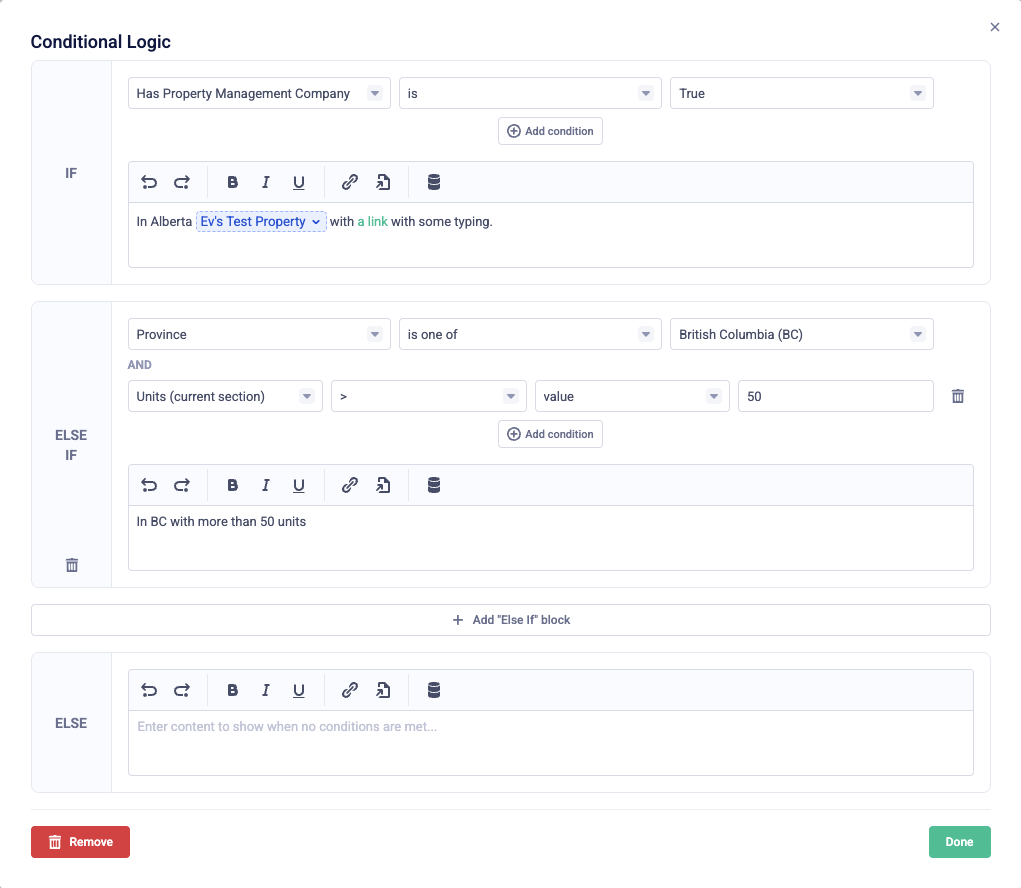
⚡️ EnhancementComponent details now include a “Costing” button that opens the Costing tab scrolled to that component➕ AddedAIC credential settings now include an “Accredited Appraiser Canadian Institute Fellow” option, which displays as “P.App., AACI, Fellow” in report signatures and signatory variables➕ AddedProfessional credential settings now include OEAQ (L’Ordre des évaluateurs agréés du Québec)⚡️ EnhancementProperty number and registration date variable options now use province-appropriate labels (for example, “Condo Number” in Ontario and “Strata Number” in British Columbia)🐛 FixedTab indentation and multiple consecutive spaces in report template text now appear correctly in generated PDFs🐛 FixedThe Construction Cost Inflation template page no longer fails to preview when a report’s property type has not been set
June 9, 2026
🎉 New Feature Web and PDF links in conditionals
Conditionals in report templates now support web links and links to other report sections, so you can combine linked text with the rest of your conditional sentence in one place. Linked text appears correctly in generated reports and PDFs.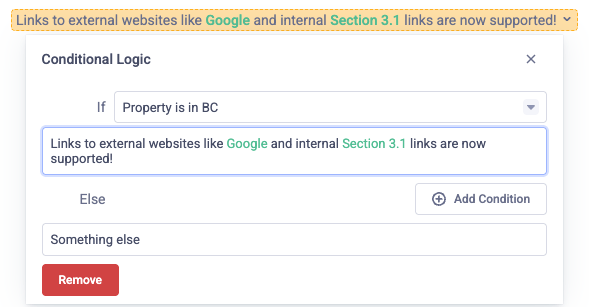
⚡️ EnhancementQualifications pages can now be added and configured in the report template layout wizard like other page types⚡️ EnhancementReport layout pages can use a Show Page Condition for reports with multiple funding models⚡️ EnhancementWhen previewing a table or graph page in templates, you see a clear note if the preview report does not include the selected funding model🐛 FixedCash flow and projection schedule tables and charts for a funding model that is not in the report are omitted from the PDF instead of showing another model’s data🐛 FixedConditional text in reports and PDFs now shows both bold and regular text instead of dropping the non-bold portion🐛 FixedAdding a library component that does not specify a report path to a report no longer causes an error when the details panel opens🐛 FixedOpening the Historical & Models tabs no longer crashes while report data is refreshing in the background
June 2, 2026
Other Changes
⚡️ EnhancementYou can now search the Reports and Properties pages by report number or property name; press Ctrl+F (or Cmd+F on Mac) to jump to the search field🐛 FixedSignatory credentials in report signatures and signatory variables now use the correct AIC formatting (for example, “P.App., CRA” and member numbers on their own line under signature fields)🐛 FixedTable page titles in generated PDFs no longer include the model name when the report has only one model🐛 FixedThe Cash Flow table in generated PDFs now shows $0 amounts in balance and contribution columns, while Special Assessment and Projected Expenditures columns still leave empty cells when there is no value🐛 FixedThe Executive Summary table in generated PDFs no longer leaves empty space on the right for provinces with a shorter reserve fund planning period
May 31, 2026
⚡️ Enhancement Faster Reports & Properties pages with pagination
The Reports and Properties pages now load your items in pages instead of all at once, so they stay fast and responsive even for organizations with a large number of items. Use the Previous and Next buttons to move between pages, sort by column, and your filters continue to work as before. Duplicating an item now also updates the list automatically without needing a page refresh.⚡️ Enhancement Per-section report templates on the Report tab
“Historical Financial Analysis” and other per-section report pages are now edited from the Report tab alongside your other report templates. On multi-section reports, choose the property section next to the template page picker when customizing a per-section page; per-report pages show all sections at once.Other Changes
⚡️ EnhancementThe Executive Summary in generated PDFs now use clearer reserve fund wording and shows the correct reserve fund planning period for properties in different provinces🐛 FixedEmails from Reserve Sense no longer show broken images🐛 FixedReordering and renaming components within a report no longer fails with an error🐛 FixedBenchmark and Component List tables no longer add extra spacing between each component when folders are not used🐛 FixedExpenditure rows in the Historical Financial Table no longer have inconsistent heights in generated PDFs🐛 FixedNumbered and bulleted lists in generated PDFs no longer break across a page between a list item’s number or bullet and its text
May 31, 2026
⚡️ Enhancement New PDF preview system

🎉 New Feature Alternate Funding Chart support in templates

Other Changes
🐛 FixedA crash which could occur when creating custom report components
May 26, 2026
Other Changes
🐛 FixedTyping quickly into templates no longer causes the PDF preview to flicker🐛 FixedSome more website performance optimizations
May 25, 2026
Other Changes
🐛 FixedFix an issue where multiple faily login attempts would result in being sent to the login page after completing the magic link flow
May 23, 2026
Other Changes
🐛 FixedEnsure email link scanners do not block magic link logins⚡️ EnhancementYour last used email is now remembered when logging out and logging back in
May 23, 2026
⚡️ Enhancement Reserve Sense accounts are now password-less
To improve security, simplify new signups, and avoid password reset problems, Reserve Sense is now using password-less authentication. Simply provide your email address when logging in, and you’ll receive the security login link via email.🎉 New Feature New public website
We’re super excited to launch our new redesigned website. Check it out at https://www.reservesense.com/
Other Changes
🐛 FixedA crash that could happen when deleting historical income sources from a report
May 19, 2026
⚡️ Enhancement Template engine now generates PDF preview
When working on report templates (whether in a specific report or at the organization level), Reserve Sense will now generate a page preview using a built-in PDF viewer allowing you to see a more accurate representation of what the final template will look like in the report.
🎉 New Feature Appendix pages are now groups
Appendix pages in report temples now have a different behaviour. Rather than standalone pages with an “Appendix” type, Appendixes now behave more like chapter groups which can contain one or more other types inside them. This allows you to create appendixes made up of a combination of standalone pages, tables, graphs and component details. This change also impacts how appendixes are shown on the “Table of Contents” page.
Other Changes
➕ AddedThe “Show Page Condition” template page option can now be set on chapters⚙ ChangeIn the PDF, updated the layout, labels and data density of the DCQ / Percent Funded table🐛 FixedApplication crash when navigating to the “Models” tab after a report component fails to be added🐛 Fixed“Component Details”, “Graph” and “Table” pages can now be placed inside chapters🐛 FixedClosed several loopholes which could allow a user to drop a template chapter inside another chapter⚠️ RemovedThe “Chapter Item” template page type has been removed (now called “Standalone”)
May 10, 2026
🎉 New Feature A new “Table of Contents” report page type allows for report and component content tables
When creating report templates, you can now set a page to be a “Table of Contents” type, which will render a full-page table of contents. The page can be configured to render a table of contents for the pages of the “Report” or for an index of all components (to be used for a component list appendix).
🎉 New Feature A new “Rate Graph” template node is now available
You can add “Rate Graph” elements to report templates via the Reserve Sense custom node dropdown menu.

🎉 New Feature A new “Component Details” template page type is now available
When selected, the “Component Details” page type will render a separate page for each component with the details of that component’s Description, Condition Analysis, Photos, etc..
Other Changes
➕ AddedIn templates, “Comparable City Inflation”, “Comparable City Building Type(s)” and “Comparable City CPI” values can now be selected for the “Report” variable➕ AddedIn templates, a new “Report has a ‘AIC — Candidate Member’ signatory” conditional is now available➕ AddedIn templates, a new “Report has multiple funding models” conditional is now available🐛 FixedWhen configuring page templates, the list of models now comes from the organization definition as opposed to the preview report
May 5, 2026
Other Changes
🐛 FixedTemplates unique to a property section (eg. “Historical Financial Analysis”) now correctly get injected into the PDF
May 4, 2026
⚡️ Enhancement Templates now support external links
Report templates can now include links to external websites. Select some text, then click the “Link” icon in the toolbar to convert the text into a link.
🎉 New Feature A new “Graph” report page type allows for data graph configurations
When creating report templates, you can now set a page to be a “Graph” type, which will render a full-page data graph based on the variant selected. The table which is shown is configurable on the “Pages” tab, where you can select “Cashflow” (with other graph types coming soon).
Other Changes
➕ AddedThe “Historical Financial”, “Cash Flow Summary” and “Projection Schedule” tables are now selectable for “Table” template page types
April 24, 2026
Other Changes
⚙ ChangePages with the “Table” type will now inherit the name of the page as the table title🐛 FixedWhen working with page templates, pages of type “Table” can now be dropped inside existing chapters🐛 FixedWhen working with page templates, chapter items can now be changed from “Chapter Item” to “Table”➕ AddedA new https://www.reservesense.com/math page explains the formulas powering Reserve Sense calculations
April 21, 2026
⚡️ Enhancement The “Board Type” input has been replaced with “Governing Body”
To better support a wider number of provinces and territories, the new “Governing Body” input allows for more detailed selection based on the location of your property. The most appropriate default will also now be automatically set based on the selected “Report Type”.
🎉 New Feature A new “Table” report page type allows for data table configurations
When creating report templates, you can now set a page to be a “Table” type, which will render a full-page data table based on the variant selected. The table which is shown is configurable on the “Pages” tab, where you can select from “Benchmark Analysis”, “Component List” or “Projected Expenditures”.
Other Changes
⚙ ChangeThe “Report Date” field has been renamed to “Effective Date”⚙ ChangeSmartSense labels renamed from “Recommended” → “Stable Deficiency”, and “Full” → “Eliminate Deficiency”➕ AddedThe “Capital Planning Report” Report Type can now be selected for reports in any province
March 27, 2026
⚡️ Enhancement Expanded “Comparable City (Costing)” rates list
You can select from up to 74 different cities for costing comparables. Rates for inflation, CPI and construction inflation have also been updated for the most recent available calendar year.
🎉 New Feature New “Photos” area and “Site Overview” support
Report photo uploads have moved to a dedicated “Photos” tab, and we’ve added support for “Site Overview” photo types which can be embedded on any page using the templating system.
Other Changes
⚠️ Removed“Report has a CUSPAP signatory” template conditionals have been removed in favor of “Report has a signatory with any AIC credential” options⚙ ChangeWhen adding a report collaborator, they will now default to being both a signatory and an inspector
March 25, 2026
Other Changes
➕ UpdatedInflation, CPI and Construction Inflation rates have been updated
March 24, 2026
🎉 New Feature Support for “Class of Study” classification
Reports can now specify a “Class of Study” and customize report templates based on this value. This is important for Ontario-based properties.
⚡️ Enhancement Report page “Show Page Condition” value now allow multi-select
When creating report page templates, you can now select more than one option. When multiple options are selected, if any of the selected options match, the page will be included in the report.
Other Changes
➕ AddedThe “Signatures” template node now includes the signatories’ AIC member number in the output
March 20, 2026
🎉 New Feature Reports can now specify a custom “Study Period”
By default, Reserve Sense reports would create projections and cashflows 30 years into the future, however you can now configure this using the new “Study Period” field on the “Inputs” tab. This field impacts projected expenditures, models and schedules. The value can now also be selected and included in report tables via the “Report” data variable.
Other Changes
➕ AddedThe organization’s “Email” field is now selectable in report template variables🐛 FixedThe “Start on new page” disabled state for report template pages is now respected in the PDF⚠️ RemovedThe “Signatories” template node has been renamed to “Signatures”⚠️ RemovedThe “Layout” options for “Signatories” template variable have been removed (use the “Signatures” node instead)
March 18, 2026
Other Changes
➕ AddedA new “Range (–)” option for the “Fiscal Year” template variable🐛 FixedBug with “Property is in Saskatchewan” conditional not working properly🐛 FixedBug where PDF generation would crash if the “Lifecycle Analysis” page was removed
March 18, 2026
⚡️ Improvement Certification Conditionals
Added the ability to setup template page conditionals and template conditionals based on the new professional certifications. For example, you can now create pages which will only appear when a signatory has an APRA certification. You can now also create conditional template statements using the same data.
Other Changes
🐛 FixedA crash that might happen when visiting the “Members” tab of the “Organization Settings” page
March 13, 2026
Other Changes
🐛 FixedIn the PDF, component appendix pages no longer fill the full page when not all sections fit on one page🐛 FixedFixed a bug which displayed an error when attempting to change a template page type to “Cover”
March 10, 2026
🎉 New Feature New cover page style option
Template administrators can now choose from one of two supported cover page designs: Matrix & Photo. Both styles will respect the organization’s default theme and color palette.
🎉 New Feature Added support for custom Construction Inflation Rates for reports
You can now pass an optional override value for the Construction Inflate Rate for each individual report by specifying the value on the “Inputs” tab. This rate will impact all property sections (for multi-sectioned reports).
Other Changes
🐛 FixedIn the PDF, fixed a bug which caused page links on the “Component Page Index” Appendix not to be clickable
March 8, 2026
Other Changes
- The organization billing email has moved to the “Billing” tab, and a new generic email field is added for organizations which can be shown to customers inside the PDF report
- Fixed a bug which caused server crashes when deleting models from a report
- Fixed a bug which caused renamed models to change their order in the report
March 7, 2026
Other Changes
- Fixed a bug where uploaded images were shown in a cropped state
- Fixed a bug where the “Historical Financial Analysis” template editor on the “Historical” tab was rendered side-by-side instead of top-to-bottom
March 6, 2026
🎉 New Feature Ability to identify report inspectors
When assigning report collaborators, you can now mark users as “Inspectors”. This value can then be used in report templates to ensure that only inspectors are shown in signature fields.
March 6, 2026
🎉 New Feature Professional Credentials
Users can now highlight their professional credentials/certifications (ie. AACI, AIC, Architect, CRA) from the personal “Settings” page. These will then be automatically reflected in the report where applicable.Administrators can review member credentials from the organization “Members” tab, as well as control where credentials appear in report templates via the new “Show Credentials” options for signatory variable.
⚡️ Improvement Improved support for alternative report types
Setting the “Report Type” will now automatically select the most optimal “Board Type” value, specifically improving support for the new “Capital Planning Report” option.Additionally, report templates pages now have several additional “Show Page Condition” values to allow you to customize report pages for different report types.
⚡️ Improvement Sticky columns for expenditures
Scrolling horizontally on the “Expenditures” tab will now keep the first 3 columns stuck to the left-hand side for easy reference and acccess.
Other Changes
⚙️ PerformanceThe app now loads 2x faster and navigation between pages is 10x faster
February 27, 2026
🌏 Enhancements & Changes
- When adding the “Model Schedule Value” variable to a template, only the “Recommended” model is now allowed as an option
- SmartSense automated calculation is now available for all Models
- SmartSense automated calculation can now be configured to use either “Recommended” or “Full” mode
- The “default contribution increase” value is now always calculated from the Construction Inflation rate, regardless of model type (previously “Minimum” models used the CPI inflation rate)
- Changing the “Report Identifier” value for a report will no longer trigger the update until the user navigates away from the page
- Added new options for “Report Type”: Contingency Reserve Fund Plan / Reserve Fund Plan and Capital Planning Report
- Added 5 new options in the “Conditional” template node to support the new “Report Type” values
🎉 New Features
- Added the ability for organization administrators to configure names and custom model defaults (in Organizations > Models)

- Added the ability to create, rename, and remove models on a per-report basis

February 13, 2026
🎉 New Features
- Report Templates > Layout
- A new “Uniqueness” field allows users to control whether or not a template can be configurable at the report or property section level
🐛 Bug Fixes & Performance
- Fixed an app crash which happens when navigating to the “Expenditures” tab immediately after adding or removing a component to the report
- Fixed a bug which caused wrong components to appear in the “Component Library” when setting multiple property types values
February 11, 2026
🎉 New Features
- Report Templates > Layout
- Added the ability to create new chapters
- Report pages can now be configured to be shown conditionally based on report data
- Newly created pages now default to “Start on New Page”
🐛 Bug Fixes & Performance
- In the PDF, fixed a bug where “Building Plan” pages would someone be followed with a blank page
February 10, 2026
🌏 Enhancements & Changes
- Setting a $0 custom total costing value for a component is now supported (previously, this would cause the costing to reset to the auto-computed value)
- Creating a new report no longer auto-sets the “Report Date” to the current date
- Setting an “Inspection Date” on a report which has no “Report Date” set yet will set the “Report Date” to the “Inspection Date”
- Setting a past “Inspection Date” for an “Ordered” report will now auto-change the status of the report to “Inspected”
🎉 New Features
- Organization administrators now have access to a new “Report Templates > Layout” page where the pages of the PDF report can be configured
- Organization administrators can now more than just the last 25 invoices on the “Billing” page
- Added the ability to collapse the sidebar on the “Historical” tab
🐛 Bug Fixes & Performance
- Fixed a bug which blocked users from deleting library components if they were used in reports
- Fixed a bug where creating the “Report Date” would show an error message
February 7, 2026
🌏 Enhancements & Changes
- When adding “PDF Link” template nodes, any report template page can now be selected
🐛 Bug Fixes & Performance
- Fixed a bug where textarea fields (like “Condition Analysis” and “Work Completed” for components) were squashed
- Fixed a bug where where income sources were ordered randomly
- Re-ordering and renaming component groups is now 20-50% faster
January 25, 2026
🐛 Bug Fixes & Performance
- Fixed a component drag & drop bug where dropping a folder with sub-folders would unnest the sub-folders
January 25, 2026
🎉 New Features
- Component Library
- Added the ability to search components
- Added the ability to re-order components
January 24, 2026
🐛 Bug Fixes & Performance
- Fixed a bug with component drag & drop where a component group could be dropped onto itself (creating unexpected group nesting)
January 22, 2026
🌏 Enhancements & Changes
- “Minimum Balance” values set on the “Models” tab, no longer apply to the report year (only apply to Year 1 onwards)
- Removed the “Dedicated Line (with Signature space)” option on the “Signatories” variables
🎉 New Features
- Added a new “Signatories” template node for rendering horizontal signature fields for each report signatory
January 16, 2026
🌏 Enhancements & Changes
- Changed the order the “Report” and “Properties” buttons in the main menu
- The permission/access system has been tuned to more tightly control “Associate” user access
🎉 New Features
- The “Signatories” variable in report templates now supports a new “Dedicated Line (with Signature space)” option, which is useful for dedicating space to signatures
January 12, 2026
🌏 Enhancements & Changes
- The “Organization / Report Templates” and “Organization / Themes” pages have moved to different locations under a new “Report Templates” menu section
🎉 New Features
- Added a new “Layouts” template section to view PDF report layouts
🐛 Bug Fixes & Performance
- Fixed a bug which caused a broken image to be shown in emails coming from Reserve Sense
December 31, 2025
🐛 Bug Fixes & Performance
- Another attempt to fix a bug where the “Current Date” template variable would not respect the current user’s timezone
December 31, 2025
🐛 Bug Fixes & Performance
- Another attempt to fix a bug where the “Current Date” template variable would not respect the current user’s timezone
December 31, 2025
🐛 Bug Fixes & Performance
- Fixed a bug where the “Current Date” template variable would not respect the current user’s timezone
December 29, 2025
🐛 Bug Fixes & Performance
- In the PDF, fixed a bug where spaces between variables were removed when using bold text
December 25, 2025
🌏 Enhancements & Changes
- Clicking the “SmartSense” button will now reset it back to its original baseline value
🎉 New Features
- Added a “Clear” button to the SmartSense toolbar
🐛 Bug Fixes & Performance
- Adjust the SmartSense calculations to improve accuracy for Full funding models
- When applying a SmartSense calculation, any “Minimum Balance” value for the model will now be removed
- Fixed a bug where clicking the “SmartSense” button would not always reset all previous table values
- Fixed a bug where the “Totals Expenditures” row on the “Historical” tab would not show all computed values
December 17, 2025
December 16, 2025
🌏 Enhancements & Changes
- Reloading the page after selecting a model on the “Models” tab will now bring you back to your previous selection
- Clicking a table cell value on the “Models” tab now auto-selects whatever value is inside
- In the “Models” tab, the “Report Year” values are now rounded to the nearest dollar
- In the PDF, if the report year has a Miscellaneous expenditure, it will now be included in the “Benchmark Analysis” table
🎉 New Features
- Beta: Added a new “SmartSense” button to the “Models” tab which can automatically compute contributions
🐛 Bug Fixes & Performance
- In the PDF, fixed a bug which caused component photos to appear stretched in the Component Details Appendix
- In the PDF, component budget % values are now only shown they are less than 100%
- Fixed a bug where adding report components can sometimes fail if adding components from the library in reverse order
December 12, 2025
🐛 Bug Fixes & Performance
- All app operations are now 250-500ms faster due to reduced network latency optimizations
- Installing critical security patches
December 5, 2025
🐛 Bug Fixes & Performance
- Fixed a bug where replacing a calculated expenditure with a manual value would generate the wrong sum total
- Fixed a bug where going to “Models” tab after deleting an expenditure on the “Expenditures” tab would cause the app to display an error
December 4, 2025
🌏 Enhancements & Changes
- Report Template Editor
- The “Current Fiscal Year Data” variable has been removed (use “Model Schedule Value” instead).
- The “Opening Balance” variable has been removed (use “Model Schedule Value” instead).
🐛 Bug Fixes & Performance
- Fixed several bugs in the report editor and the generated PDF which would ignore computed “Special Levy” and “Interest Income” values for the report year when computing the “Income Total”
- Fixed a bug where inserting the last library component twice wouldn’t put it last in the order of report components
November 29, 2025
🌏 Enhancements & Changes
- Report Template Editor
- When using “Image” nodes that support multiple images, all images will now be included (not just the first)
- Provide more clarity to users about how to add a property picture
- Creating a property without specifying a “Country” is no longer allowed
- The “Total number of units” field on properties has been removed (use “Number of units” on property sections instead)
- Added the ability to create a new report from the property page
- In the “Models” tab, the Minimum Balance label now says “Minimum Balance (as of the Report Year)”
November 12, 2025
🌏 Enhancements & Changes
- Report Template Editor
- When inserting Plain list or Styled list nodes while text is selected, the selected text is no longer deleted
🎉 New Features
- The behaviour of “Default Contribution Increase” fields on the “Models” tab has changed. The field will now default to the “Construction Inflation Rate” for Adequate and Full models, and the “CPI Inflation Rate” for the Minimum models. Users can override the default values per-report if needed.
🐛 Bug Fixes & Performance
- Fixed a bug where changing one of the “Comparable” rate fields on the “Inputs” tab would not update the rates on the “Models” tab until a full page refresh was done
November 6, 2025
🐛 Bug Fixes & Performance
- Fixed the formatting of the DCQ value for “Model Schedule Value” variable in report templates
November 6, 2025
🌏 Enhancements & Changes
- Report Template Editor
- The “Model Schedule Value” template variable now supports selecting the DCQ value
November 4, 2025
🌏 Enhancements & Changes
- Report Template Editor
- Added support for a new “Plain List” node
- In the PDF, updated the phrasing of “Appendix: Funding Reserve Expenditures” to remove mention of “capital gains” in favor of “investment income”
November 1, 2025
🌏 Enhancements & Changes
- Report Template Editor
- Pressing tab inside a list now allows you to create nested list group
- All list nodes (bullet list, numbered list, styled list) are now grouped under a list “Lists” toolbar button
🐛 Bug Fixes & Performance
- In the PDF, improved the page rendering rules for “Alternate Funding Models” appendix to handle large multi-sectioned reports
- In the PDF, adjusted the width of the Y-axis labels for the “Alternate Funding Models” appendix to prevent text cut-off
October 26, 2025
🌏 Enhancements & Changes
- Report Template Editor
- Remove duplicate “Report has a CUSPAP signatory” conditional rule
October 26, 2025
🐛 Bug Fixes & Performance
- Ensure “Executive Summary” template doesn’t show up as editable when using HFA links
October 26, 2025
🌏 Enhancements & Changes
- Report Template Editor
- Added support for 2 new conditional options:
- “First property section has negative deficiency in first year’s adequate model”
- “First property section has 0 deficiency in first year’s adequate model”
- The “Deficiency Table” node has updated titles for “Percent Funded” mode
- The “Deficiency Table” node no longer forces itself to be rendered on a new page in the PDF in some cases
- Added support for 2 new conditional options:
🐛 Bug Fixes & Performance
- Page links in the PDF report now more accurately compute chapter numbers in situations where chapters may have pages with missing headers
October 25, 2025
🐛 Bug Fixes & Performance
- Fixed a bug causing date pickers to render with spin arrow inputs, blocking the visibility of the date (Chrome only issue)
October 24, 2025
🐛 Bug Fixes & Performance
- Fix for report RTE components not filling full height on production builds
October 24, 2025
🌏 Enhancements & Changes
- Report Template Editor
- Renamed the “DCQ Table” component to “Deficiency Table”
- The “Deficiency Table” Lexical node now supports “Percent Funded” as a calculation type
- The “Analysis of Reserve Fund Operations” page now uses the “Percent Funded” table
October 22, 2025
🐛 Bug Fixes & Performance
- Fix for dependency import cycle to fix broken production builds
October 22, 2025
🐛 Bug Fixes & Performance
- In the PDF, updated the link to the Manitoba Condominium Act in the Appendix sections
October 21, 2025
🐛 Bug Fixes & Performance
- Fixed a bug where the Table of Contents page in the PDF was slightly narrower than all the other pages
- Fixed a bug which sometimes caused a flash of red error messages in “Property Sections” form when first navigating to the “Inputs” tab of the report builder
October 17, 2025
🌏 Enhancements & Changes
- Report Template Editor
- Added support for injecting images into templates that haven’t been uploaded yet (eg. adding a “Building Plan” photo when no reports have one defined yet)
- Uploaded images now support 4 distinct position modes:
Left,Right,CenterandFull - Uploaded images no longer support setting custom widths (size is controlled entirely via height resizing)
🐛 Bug Fixes & Performance
- Fixed a bug where the “Contributions-to-Operating Percentage” value for “Model Schedule Value” variables was not showing as a percentage (also now rounds to nearest 10th of a percent)
- Fixed a bug where the “Operating Budget (Report Year)” value for “Property Section” variables was not formatting as currency
- Fixed a bug which allowed users to inject images into heading nodes which caused PDF report generation to break
- Fixed a bug which caused images uploaded to report templates to be forced to display in the PDF with limited height
October 14, 2025
🌏 Enhancements & Changes
- Report Template Editor
- The “Property Section” template variable now supports extracting the “Operating Budget (Report Year)” value
- A new “Contributions-to-Operating Percentage” option has been added to the “Model Schedule Value” variable
🐛 Bug Fixes & Performance
- Fixed bug where “Fiscal Year” report template variable would not respect the “Year Offset” when using Start and End “Edge Format” options
- Fixed a bug where the “Model Schedule Value” variable would not return all property section values when using “All” sections option
October 9, 2025
🌏 Enhancements & Changes
- Report Template Editor
- The following report page templates can now be configured at the organization level:
- “Appendix: Assumptions and Limiting Conditions”
- The following report page templates can now be configured at the organization level:
🐛 Bug Fixes & Performance
- In the PDF, fixed a bug where “Life Cycle Analysis” and “Current Cost Estimates” pages were being shown twice
- In the PDF, fixed a bug where the “Historical Financial Analysis” page would show up empty
- In the PDF, fixed a bug where the title for the “Current Cost Estimates” page would not render
October 5, 2025
🌏 Enhancements & Changes
- Report Template Editor
- The following report page templates can now be configured at the organization level:
- “Recommendations and Best Practices”
- Added the main chapter title to the “Component Descriptions” page template
- Added a new “Styled List” custom component (used on the “Recommendations” page)
- The following report page templates can now be configured at the organization level:
🐛 Bug Fixes & Performance
- Fixed a bug where ordered list items in templates would display dots instead of numbers
October 1, 2025
🐛 Bug Fixes & Performance
- Ensure the “Reports” tab scrolls when the browser window is very short
- Fixed a bug which caused “Inspection Notes” PDF formatting to be incorrect
September 27, 2025
September 27, 2025
🐛 Bug Fixes & Performance
- Fixed a bug where the PDF preview for some report templates would appear blank
- Fixed a bug where the “Notice to Reader” page would appear sometimes even if its content was blank
September 27, 2025
🌏 Enhancements & Changes
- Report Template Editor
- Report page headings can now be viewed and modified for all supported pages
- Added support for a new “Number of Sections” variable
- The “Model Schedule Variable” now supports a “Section” option to extract a value for a specific property section (applies to sectioned reports only)
- The “Property Section” variable now supports an “Iterator” option to control data showing data for all vs. a single section (applies to sectioned reports only)
- The following report page templates can now be configured at the organization level:
- “Sections”
- In the PDF, the “Sections” page now shows the names of the sections in a single line rather than in a numbered list
🐛 Bug Fixes & Performance
- Fixed a bug which would modify an organization-level template when the user meant to actually edit a report-level template
- Fixed a bug which prevented users from pressing Enter to create a new line at the start of a header node in the template editor
- Fixed a bug which prevented the “Historical Financial Analysis” template previewed shown for default values
- Fixed a bug where the template preview for “Historical Financial Analysis” would also show the first property section even when editing the template for a different property section
- Fixed a bug with the “Property Section” template variable which always showed the value from the first section (for multi-sectioned report) rather than the active property section
September 18, 2025
🐛 Bug Fixes & Performance
- Fixed a bug which prevented the “Professional Details” editor to load for some users
- In the PDF, fixed a bug which caused the “Appendix: Qualifications” page to render as a blank page
- In the PDF, fixed a bug which caused the “Deficiency Analysis” table to render as plain text without any styling
September 16, 2025
🐛 Bug Fixes & Performance
- Ensure organization templates are loaded properly as a default
September 16, 2025
🌏 Enhancements & Changes
- Report Template Editor
- Removed the ability to reset an organization “Report Template” to avoid a potentially destructive, non-reversible operation
- The following report page templates can now be configured at the organization level:
- “Building Plans”
- “Development End of Life”
- “Governing Documents Review”
- “Historical Financial Analysis”
- “Previous Depreciation Report”
- “Property Description Summary”
- “Section Title” and “Section Subtitle” elements in report templates now have additional options
- “Show Chapter” controls whether or not the heading will be prefixed automatically with the relevant report chapter counter
- Refreshing the page while editing a specific template will now take you back to the previously edited template immediately
🐛 Bug Fixes & Performance
- In the PDF, the “Avg Monthly Contributions per Unit” row values are now rounded to the nearest dollar
September 12, 2025
🌏 Enhancements & Changes
- Report Template Editor
- Added a new “DCQ Table” widget which can be embedded on any page
- In the PDF, the “Executive Summary” page has been updated with some tweaks to rounding and formatting
🎉 New Features
- The following PDF page content can now be customized via an organization-level template
- Deficiency Analysis
September 8, 2025
🌏 Enhancements & Changes
- Report Template Editor
- Added support for linking to chapter headers in the “PDF Link” node
- Added support for a new “Construction Inflation Rate(s)” variable
- Added support for a new “Interest Rate” variable
- Added support for a new “CPI Inflation Rate” variable
🎉 New Features
- The following PDF page content can now be customized via an organization-level template
- Methodology
- Component Descriptions
- Life Cycle Analysis
- Current Cost Estimates
- Economic Forecasting
- Benchmark Analysis
- Reserve Fund Expenditures
- 30-Year Reserve Fund Schedule
- Cash Flow and Charts
🐛 Bug Fixes & Performance
- Fixed several issues PDF rendering engine to more accurately preserve consistent spacing between paragraphs and block elements which fixes a bug where the CUSPAP appendix would sometimes inject a blank page into the report
- Fixed an issue preventing a scrollbar from appearing for large templates pages
September 4, 2025
🎉 New Features
- Added an “Export Cashflow (CSV)” button to the report builder to allow users to export all cashflow table data
- Added an “Export Reserve Fund Projection (CSV)” button to the report builder to allow users to export all reserve fund project tables
September 3, 2025
🌏 Enhancements & Changes
- Users with the “Report Writer” role can now reassign any report
🐛 Bug Fixes & Performance
- Fixed an issue where report templates would not support empty paragraphs as a way to inject empty spaces (specifically for adding spacing for signatures)
- Fixed a bug which caused unnecessary scroll spacing on some pages
- Fixed a bug which caused the Report Notes section not to fill the full height of the page
- Fixed a bug which causes the report builder to reload when navigating from tab to tab
August 28, 2025
🐛 Bug Fixes & Performance
- Fixed a bug which prevented the content on the “Expenditures” tab from being scrollable in some conditions
August 27, 2025
🐛 Bug Fixes & Performance
- In the PDF, fix bug with NaN values sometimes appearing on Executive Summary “Percent Funded” rows
- Fixed a bug where navigating from the “Component Library” to a report and back, would not always show the correct list of library components
August 27, 2025
🌏 Enhancements & Changes
- Improved the browser titles of several app pages to make multitasking across Reserve Sense pages more convenient
- In the PDF, updated the layout and design of the “Executive Summary” page
🎉 New Features
- Added a new Manitoba-only optional “Current RF Balance” field on the Historical tab of the report builder which will be used in the “Executive Summary”
- Allow users to view and edit “Property Type Filter” and “Province Filter” values for components in the library
🐛 Bug Fixes & Performance
- Added the missing “Reset Template” button for the “Purpose of Report” template
- Fixed a bug where components which are specific to certain property types were not being shown in the Component Library
- Fixed a bug where updating a report property’s province would not reset the component library accordingly on the “Components” tab
August 16, 2025
🌏 Enhancements & Changes
- Increased the width of Historical tab sidebar to fit the full template editor
- In the Component Library, the “Edit Costing Instructional Note” button now appears on the Costing tab
- Report Template Editor
- Added a new “Province Regulation” template variable
🎉 New Features
- The “Purpose of Report” page content can now be customized via an organization-level template
August 6, 2025
🌏 Enhancements & Changes
- Renamed “Clean Up Premium, Maximum” field to “Clean Up Premium” in the Costing matrix
- Newly onboarded organizations are now created with a sample property, report and default report theme
- The full component path (rather than only the name) is now editable in the Component Library
- Removed “Expected Lifespan” and “Effective Age” fields from the component library costing matrix
🐛 Bug Fixes & Performance
- Report Template Editor
- Fixed bug where the “Report has multiple sections” conditional would not always work as expected
- Fixed bug where
MMMM d, yyyydate formats were actually displayingMMMM dd, yyyydates
- Other
- Fixed a bug where some button text was invisible during new organization onboarding
August 5, 2025
🌏 Enhancements & Changes
- Component Library
- “Effective Age” is no longer shown in the Component Library
- In the Costing matrix, renamed “Cost per SL” to “Cost per Lot”
- The selected component in the Component Library is now highlighted
- The first created “Costing Group” for a component will now default to the name “Main Costing Group”
- Report Template Editor
- Images will now respect their original aspect ratio
- Images can now be resized
🐛 Bug Fixes & Performance
- Fixed a bug which prevented the ability of editing costing item tooltips in the Component Library
August 1, 2025
🐛 Bug Fixes & Performance
- Fixed some broken styles on the public website
- Fixed a bug which would show duplicated loading spinner when new organizations are created during onboarding
- Fixed missing green color on “Download PDF Report” button
August 1, 2025
🌏 Enhancements & Changes
- Report template editor
- Added support for a new “Report has multiple sections” conditional statement
- Added a new “Property Section” variable
- Added a new “Address (Full)” value for the “Property Management Company” variable
- In the PDF, the order of signatories on Qualifications Appendix now prioritizes signatories with CUSPAP and AACI credentials first
- Attempting to update a component to a name of a component that already exists will now return a more clear error message
🎉 New Features
- Added the ability to create & delete new “Component Library” components
- Added a dedicated delete button for report components
🐛 Bug Fixes & Performance
- In the PDF, fixed a bug where the property management company address wasn’t formatted nicely on the Executive Summary page
- Fixed a bug where the “Country” value is used for “Property” or “Property Management Company” template variables would always show as uppercase
July 29, 2025
🐛 Bug Fixes & Performance
- Ensure Page Template headers include the ID, otherwise Table of Contents shows page as 0
July 29, 2025
🌏 Enhancements & Changes
- Report template editor
- Added support for a new “Report has multiple signatories” conditional statement
- Added support for a new “Report has a CUSPAP signatory” conditional statement
- Added support for a new “Current Date” variable
- Empty list items are now removed from the output (allowing users to create conditional list items such as those on the Certification page)
🎉 New Features
- The “Certification” page content can now be customized via an organization-level template
🐛 Bug Fixes & Performance
- Improved overall app performance by 20-30% by optimizing database requests
- Fixed a bug when “Interest Income” for the report year is auto-computed it was not included in the “Income Total” calculation
July 22, 2025
July 17, 2025
🌏 Enhancements & Changes
- Report template editor
- A new “Update Period” variable has been added
- A new “Organization” variable has been added
- Fixed a date formatting issue for the “Report” variable
- Added support for the YYYY date format for the “Report” variable
🎉 New Features
- The “Copyright” page content can now be customized via an organization-level template
🐛 Bug Fixes & Performance
- Fixed a bug where empty report template pages would fail to load and get stuck with a loading spinner
July 12, 2025
🐛 Bug Fixes & Performance
- Fix bug with PDF only outputting a single cover letter page
July 12, 2025
🌏 Enhancements & Changes
- Report template editor
- Added support for “Property is in the Yukon” in “Conditional” blocks for report templates
- The “Board Type” variable now defaults to “Add Corporation” being enabled
- The “Fiscal Year” variable now supports a new “Year Offset” option
- The “Model Schedule Value” variable now support sectioned properties
- A new “Province Act” variable has been added
🎉 New Features
- The “Cover Letter” page content can now be customized via an organization-level template
- Added support for left, center and right alignments in report templates
- Added support for 2 column layouts in report templates
🐛 Bug Fixes & Performance
- Ensure users are not allowed to delete the last property section of a report (to avoid accidental data loss)
- Fixed a bug where “Professional Details” changes weren’t reflected in the generated report PDF
- Fixed a bug where users with the “Associate” role could not be assigned to reports
July 10, 2025
🐛 Bug Fixes & Performance
- Re-implement the fix for the bug where editing report data would cause the “Historical Financial Analysis” template to get stuck on a “Loading…” state
July 10, 2025
🐛 Bug Fixes & Performance
- Fixed a bug which would show property sections of previously viewed reports instead of only the property sections of the currently viewed report
July 5, 2025
🌏 Enhancements & Changes
- The “Strata Number” for properties is no longer allowed to have symbols other than ”-”
🎉 New Features
- Added “Management Board” as an option for the report “Board Type”
🐛 Bug Fixes & Performance
- Fixed a bug which would cause the template editor to crash when selecting “Year 30” for the “Model Schedule Value” variable
- Fixed a bug where editing report data would cause the “Historical Financial Analysis” template to get stuck on a “Loading…” state
July 1, 2025
🌏 Enhancements & Changes
- All rich text editors (Report templates, Organization templates, Report Notes and Professional Details in your profile) have been migrated to a new architecture that supports custom variable editing
- “Cover” and “Building Plan” photo uploads now appear at the bottom of the “Report” tab, and the template editor shows the content preview automatically to the right
🎉 New Features

- A new report template editor now allows visual editing of Reserve Sense variables, conditionals and page links
- Added a button that allows users to reset the report template back to its organization default state
🐛 Bug Fixes & Performance
- Fixed a bug where component tree items wouldn’t auto expand when dragging an item over them
June 8, 2025
🐛 Bug Fixes & Performance
- Fixed bug with double
##characters appearing on the Costing tab - Reduced likelihood of seeing “Failed to fetch” error when building PDF reports
June 1, 2025
🌏 Enhancements & Changes
- “Export Inspection Notes” and “Export Project Expenditures” buttons have moved to a ”…” menu at the top of the report builder

🎉 New Features
- Added the ability to export a CSV of Takeoffs
🐛 Bug Fixes & Performance
- Fixed a bug which would show the wrong
#1number on takeoffs in the “Takeoffs” tab for sectioned reports
May 14, 2025
🌏 Enhancements & Changes
- Changed “Percent Increase” label to “Contributions Percent Increase” in Models tab
- Added a tooltip to “Add Costing Group” button to make it more clear what it does
🎉 New Features
- A new “Export Projected Expenditures” button allows users to export projected expenditures data to a CSV
🐛 Bug Fixes & Performance
- Fixed a bug where various dropdown menus would stay open even when the user has selected an option already
May 4, 2025
April 29, 2025
🌏 Enhancements & Changes
- Completed support for Yukon properties (updated Interest Rate and Glossary Appendix pages)
- Updated construction inflation numbers to the latest Q1 2025 data
April 27, 2025
April 24, 2025
🌏 Enhancements & Changes
- Users with the “Report Writer” role can now view all reports
- Users with the new “Associate” role can only view reports & properties they have been assigned to
🐛 Bug Fixes & Performance
- Users without the permission to purchase reports will now see a tooltip explaining that fact on the “Build Report” button
- Make it clear to users that a page refresh is needed after reports are duplicated
April 20, 2025
April 19, 2025
🎉 New Features
- Added the ability to create a different “Historical Financial Analysis” page template for each section in a sectioned report
April 18, 2025
🐛 Bug Fixes & Performance
- In the PDF, fixed a text formatting issue on the CUSPAP Appendix page
April 11, 2025
🌏 Enhancements & Changes
- Updated the tooltip for “Property Type” to provide additional context on its impact
- Added a sortable “Province” column to the “Properties” page
April 5, 2025
🐛 Bug Fixes & Performance
- In the PDF, fixed a bug causing bookmarks to show up as “undefined” and failing to link to the right page
April 4, 2025
🌏 Enhancements & Changes
- “Inspection Notes” PDFs now auto-download, rather than open in a new browser tab
April 1, 2025
March 27, 2025
🐛 Bug Fixes & Performance
- In the PDF, fixed a bug where the “Budget %” for “Estimated Current Cost” of component was shown as 0% by default, rather than 100%
March 19, 2025
🌏 Enhancements & Changes
- In the PDF, updated the legislation Strata Property Regulation reference for BC properties on the Cover Letter page
March 16, 2025
🐛 Bug Fixes & Performance
- In the PDF, fixed a bug where the Annual Reserve Fund Contributions Running Totals Charts has Y Axis labels cut off for sectioned reports
- In the PDF, fixed a bug where Annual Reserve Fund Contributions charts would sometimes display models in the wrong order
March 14, 2025
🐛 Bug Fixes & Performance
- Fixed a bug which would cause the report builder to fail to load if the “Comparable City (Construction Inflation)” rate was set to “British Columbia”
March 11, 2025
🌏 Enhancements & Changes
- Updated Interest, CPI and Construction Inflation rates to the latest 2024 data
- The “Eleven census metropolitan area composite” Construction Inflation comparable rate has been replaced with “Fifteen census metropolitan area composite”
- Updated all RSMeans costing data to the latest updates
🐛 Bug Fixes & Performance
- Fixed a bug where in some rare cases models would occasionally display negative “Expenditures from Reserve”
March 7, 2025
February 28, 2025
🌏 Enhancements & Changes
- In the PDF, made some minor wording changes to the Cover Letter with regards to actions required by the strata board members
- In the PDF, renamed the “Recommendations” section to “Recommendations and Best Practices”
🐛 Bug Fixes & Performance
- Improve the performance of several pages by removing unnecessary network requests
- Enabled fluid compute to optimize application load times
February 27, 2025
🌏 Enhancements & Changes
- Added additional diagnostic data to diagnose why certain PDFs are more likely to crash during the build stage
- In the PDF, updated the wording on the “Certification” page when cosigners are included
🐛 Bug Fixes & Performance
- Improved the stability of PDF builds for especially large reports
February 25, 2025
🎉 New Features
- Administrators can now download detailed invoices for each report purchase in the Billing section
February 25, 2025
🐛 Bug Fixes & Performance
- Fixed a bug which caused the app to crash when building certain reports
February 24, 2025
🌏 Enhancements & Changes
- Reports are now billed via credit card payments rather than invoices. A credit card must now exist on file before new reports can be purchased.
🎉 New Features

- Organization administrators can now review their billing information on a new “Billing” page. From here you update your credit card, review the payment history, and download receipts.
February 21, 2025
🌏 Enhancements & Changes
- Duplicating a report now duplicates its collaborators too
- In the PDF, in the Benchmark Analysis table, the “Relative Contribution Weight” value is now computed from the “Ideal Annual Contribution” value
🐛 Bug Fixes & Performance
- Fixed a minor bug where property management companies were sorted in reverse order
February 11, 2025
🐛 Bug Fixes & Performance
- Fixed a mistake in the Funding Schedule charts which showed the “Expenditures from Reserve” value without excluding the special levy
- In the PDF, fixed a minor wording mistake on the Certification page
February 8, 2025
🐛 Bug Fixes & Performance
- Fixed a bug which required invited users to provide an “Early Access Code” during registration
- Fixed a bug which would sometimes cause component stages to be shown in an order different than how the stages were created
- Fixed a bug which would cause duplicated components or new component stages to randomize the order of component stages, costing groups and costing items
January 31, 2025
🐛 Bug Fixes & Performance
- Fixed an issue where the Models tab would still show “Special Levy” label for “Special Assessment”
- Fixed a bug which caused extra
\ncharacters to appear in component write-ups
January 31, 2025
🌏 Enhancements & Changes
- In the PDF, adjusted the wording of some “Recommendations” and fixed a few grammatical errors
- In the PDF, adjusted the layout of component stages in Appendix D to improve legibility
- In the PDF, changed “Ideal Closing Balance” to “Ideal Opening Balance” in Section 5.1 Benchmark Analysis description
- On the “Historical” tab, the current year’s “Interest Income” will now show a grayed out value for the calculated interest income
- The “Funding Analysis” field for Components has been renamed to “Scope of Work”
- Non-BC properties will now label “Special Levies” as “Special Assessments”
🐛 Bug Fixes & Performance
- Fixed a bug where staged components would sometimes display the edit form incorrectly
- In the PDF, fixed an issue where long component stage names would overflow their boundaries in Appendix D
- In the PDF, fixed a bug where long page names would overlap page numbers in the Table of Contents
January 29, 2025
🌏 Enhancements & Changes
- In the PDF, the date the bottom of the Certification page will now be the date when the PDF is generated (rather than the Report Date)
🐛 Bug Fixes & Performance
- Fixed a bug which prevented users from signing up for early access on the website
- Fixed a bug where users with no name set will appear as
nullin the list of report collaborators
January 27, 2025
🌏 Enhancements & Changes
- Added several guards to prevent invalid expenditure records from being inserted into reports when working in the Historical section
🎉 New Features

- Added the ability for users to drag & drop to reorder and re-parent components in the report
- This feature also allows you to drop a component from one “property section” to another
- NOTE: At the moment there’s no obvious way to create new “component groups” (aka. folders). When the last component inside a folder is moved out of the folder, the folder will be automatically removed.
🐛 Bug Fixes & Performance
- Fixed a bug with “Filter by Collaborators” dropdown not always allowing users to scroll down
- Fixed a keyboard accessibility bug where it would sometimes be impossible to press Tab to focus certain elements
- Fixed a bug where some “Average Monthly Contribution” values in Models would cause the chart to jump above the $0 value on the Y-Axis
January 23, 2025
🐛 Bug Fixes & Performance
- Another fix to ensure that on the “Models” tab, models are always sorted as Minimum, Adequate, Full (in that order)
January 22, 2025
🐛 Bug Fixes & Performance
- On the “Models” tab, ensure models are always sorted as Minimum, Adequate, Full (in that order)
- Fixed a bug which caused the selected Property Management Company selection to not persist in the app
January 9, 2025
December 29, 2024
🐛 Bug Fixes & Performance
- Migrated from PlanetScale to Railway’s Postgres to reduce infrastructure costs and increase general app performance by 1.5-2x
- Provide feedback to users who enter invalid registration email verify codes
December 17, 2024
🐛 Bug Fixes & Performance
- Fixed a bug where some years in the Historical tab would not be shown until manually created
November 30, 2024
🐛 Bug Fixes & Performance
- Fixed an accidental bug where PDF reports would only show the cover page
November 30, 2024
🌏 Enhancements & Changes
- In the PDF, round the adjusted contributions on the cover letter page
November 17, 2024
🐛 Bug Fixes & Performance
- Fixed an issue where invited users were unable to get past the “Continue” button on the registration form
November 16, 2024
🐛 Bug Fixes & Performance
- Fixed an issue where links in Reserve Sense emails would take users to “Insecure URL” pages
- Fixed an issue where users receiving invitation emails were not show the sign up page
November 14, 2024
November 12, 2024
🌏 Enhancements & Changes
- Added the ability to specify a “Costing Instructional Note” for library components
November 11, 2024
🌏 Enhancements & Changes
- Minor design update to the Costing grid to allow for more editing functionality
- Added the ability to rename Costing Groups
November 8, 2024
🌏 Enhancements & Changes
- Typing ”=” into an input field that support formulas now toggles the input into “Formula mode” automatically
- Improved user-friendliness of invalid formulas when common mistakes are typed
🎉 New Features
- A formula value can now be set on any costing item, not just those that come with pre-existing library formulas
🐛 Bug Fixes & Performance
- Fixed a bug which allowed users to set a component library takeoff name to an empty value
- Fixed a bug where deleted component library takeoffs would cause the costing matrix for that component to show errors
November 8, 2024
🌏 Enhancements & Changes
- Added the ability to edit costing data for library components
- In the PDF, in the CPI Inflation Appendix, added a list of CPI regions and mark the selected one
🐛 Bug Fixes & Performance
- In the PDF, in the “Projected Expenditures” table, unset “Expective Lifespan” and “Effective Age” values will now show as 0 rather than a blank
- In the PDF, fixed a bug which caused the address to overlap the Reserve Sense logo on the cover page if the address was too long
November 6, 2024
🌏 Enhancements & Changes
- Added the ability to create & delete takeoffs in the component library
- In the PDF, changed content to better reflect CUSPAP requirements
- Added component numbers to the “Inspection Notes” print out
🐛 Bug Fixes & Performance
- Moved the “Townhouse—BC” library component under the “Substructure and Underground Garage” folder
- Fixed a bug which caused 31 years (instead of 30 years) to be shown in the Expenditures and Models tabs, as well as the Cashflow table in the PDF
- Fixed a bug where a paid report would be marked as non-invoiced after PDF generation was aborted
October 30, 2024
🎉 New Features
- The “Component Library” section now allow for editing basic component data and takeoffs
- Added the ability to provide “Early Adopter Discount” to select organizations
🐛 Bug Fixes & Performance
- In the PDF, fixed a bug where the Contruction Inflation Appendix would not properly mark property types as selected in the Stats Canada list
- In the PDF, fixed a bug where the “2.5 Development End of Life” section wouldn’t display the report’s end of life year properly
October 24, 2024
🐛 Bug Fixes & Performance
- In the PDF, fixed a bug with the CPI rate not being rounded on the CPI Appendix page
- Fixed an issue where the schedules calculation would sometime generate closing balance values of -0 (negative zero)
October 12, 2024
🌏 Enhancements & Changes
- Added the ability to see and sort by property types on the Properties lister page
🐛 Bug Fixes & Performance
- Fixed a bug with alerts in the bottom right corner sometimes appearing behind the blurred overlay
- Fixed a bug where paid duplicated report is also marked as paid
- Fixed a bug where sorting reports by “Collaborator” would yield somewhat random results
- Fixed a bug where the “Property Description Summary” page was failing to render; now references report signatories correctly
October 8, 2024
🌏 Enhancements & Changes
- Going to the Reports will by default take you to a list of reports filtered to those where you are the collaborator
- When you add a collaborator to a report, they are now automatically added as a signatory
- Added the option to filter Reports by “None” to quickly find any reports which are missing collaborators
October 6, 2024
🌏 Enhancements & Changes
- In the PDF, Section 2.4’s title will now adapt to the selected Report Type (“Depreciation Report” vs. “Reserve Fund Study”)
- Improved the responsiveness of form elements on smaller screens (specifically on the “Inputs” tab of the report builder)
- Minor website wording changes
- Added a Privacy Policy & Terms of Service
🎉 New Features
- Added the ability to specify collaborators and signatories for reports (Note: at least one signatory must be specified for a report)
- Added the ability to filter the Reports list by any report status and collaborator combination
🐛 Bug Fixes & Performance
- In the PDF, fixed a bug which caused PDF bookmarks to always take the user to the last page
- Fixed a bug which prevented “Report Writer” users with the “Purchaser” flag set still not able to purchase new reports
- Fixed a bug where sorting by the “Property” name on the list of Reports wouldn’t work properly
- Fixed a bug where after creating a new component stage its takeoffs and costing data wouldn’t appear until a full page refresh
September 25, 2024
🐛 Bug Fixes & Performance
- Fixed a bug with the Organization settings not loading fully on initial page load
- Fixed a bug with Administrators not being able to see the Purchaser state for organization members
- Fixed a bug with the “Location” column in the Reports table not being sortable
- Fixed a bug with double scrollbars appearing on the “Properties” page
September 25, 2024
🌏 Enhancements & Changes
- Updated the website content to make it clear to users that Early Access is now available
- The user’s active organization and login email is now displayed in the bottom left of the main app sidebar
- Updated the font used in the generated PDF to a more modern font
🎉 New Features
- Organization admins can now change another user’s role to either “Admin”, “Report Writer” or “Specialist”
- Organization admins can now specify which members have purchasing power (ie. the ability to buy new Reserve Sense reports)
- Organization admins can now remove other members (and themselves) from the organization
- Added “Created On” column on the “Properties” page
- The Properties, Reports and Organization Members lists can now be sorted by any column
🐛 Bug Fixes & Performance
- The list of Reports no longer flickers with “No items yet” briefly during initial page load
September 19, 2024
🌏 Enhancements & Changes
- In the PDF, the “Projected Expenditures” tables are now always generated on their own dedicated pages
🐛 Bug Fixes & Performance
- Fixed a bug where a report that’s already been paid for still shows the “Confirm Report Purchase” modal, when navigating to the report immediately after visiting the “Reports” page
- Fixed a bug where the “Build Report” button would sometimes change to “Purchase & Build Report” unnecessarily
September 18, 2024
September 12, 2024
🌏 Enhancements & Changes
- Updated component library with a new “Townhouse” component under “Structural and Architectural”
🎉 New Features
- Added the ability to create multiple report color themes and set an active report theme for the organization
- On the “Historical” tab of the report builder, the entire “Historical Financial Analysis” page template is now configurable (not just the custom paragraph, as was the case before)
🐛 Bug Fixes & Performance
- Fixed a minor bug which would cause styling of buttons on the website to be incorrect
- Fixed a bug where in rare cases going to the Components tab of a report would crash the app
- Fixed a bug where there was no user feedback after uploading component or report photos (FORGE-WEB-2D)
- Removed the “Delete Organization” button from the organization settings page for now
September 5, 2024
August 28, 2024
August 23, 2024
🐛 Bug Fixes & Performance
- Fixed a bug causing component search not to work on the Components tab
August 22, 2024
🐛 Bug Fixes & Performance
- Fixed a bug which showed inconsistent component numbers in some parts of the PDF and the app
- Fixed a bug which sent invoice email confirmations to the wrong email address
August 21, 2024
🌏 Enhancements & Changes
- When building a report for the first time, the button will now say “Purchase & Build Report” and ask the user to confirm the purchase before continuing
August 19, 2024
🌏 Enhancements & Changes
- Important: When generating a report for the first time, the user will now be invoiced for that report, and an invoice will be sent to the organization’s billing email
- In the PDF, updated CUSPAP Appendix wording from “intended” to “authorized”
- Component number rules have changed such that staged components are now given letters (eg. #1a, #1b, etc…)
- Organizations details have been updated to support billing addresses (used for invoices)
- All outgoing emails from Reserve Sense now have a modern template
August 13, 2024
🌏 Enhancements & Changes
- In the PDF, one-time expenditures now show up as
#1.1,#1.2, etc… rather than taking up a component stage number slot
🐛 Bug Fixes & Performance
- Fixed a bug which prevented edits to the Models table from saving
- Fixed a bug which prevented edits to the Reports templates from saving
- Fixed a bug preventing multiple postal codes from being added to properties
August 12, 2024
🌏 Enhancements & Changes
- Completed an architectural platform upgrade to Elysia and Typebox in preparation for the Hub
🐛 Bug Fixes & Performance
- Improved the performance of all application page loads resulting in faster site navigation (should be around 2x faster on average)
- Fixed a bug which prevented users from being able to edit component group names in sectioned reports
August 10, 2024
🌏 Enhancements & Changes
- In the PDF, the “Opening Balance” and “Closing Balance” rows of the “Reserve Fund Projection” table will now show $0 instead of a blank cell
- Images uploaded to Reserve Sense can now be downloaded in their original format
🐛 Bug Fixes & Performance
- In the PDF, fixed an issue which caused the table of contents, custom template pages (like “Notice to Reader”) and “Sections” to be incorrect
July 7, 2024
🌏 Enhancements & Changes
- Added component numerical values (
#1,#2,#3, etc…) to all relevant areas of the PDF as well as the report builder - In the PDF, the building plan photos are now vertically centered within their available page space
- In the PDF, the “date of completion of the study” in the CUSPAP Appendix now uses the timezone of the user, rather than the timezone of the Reserve Sense server
🎉 New Features
- Added the ability for organizations to customize many of the colors in the PDF reports
🐛 Bug Fixes & Performance
- Fixed a minor bug where a component’s system id would be shown to users when editing a component group name in the “Components” tab
- In the PDF, fixed a bug which prevented bold text from showing up as bold
June 24, 2024
🐛 Bug Fixes & Performance
- Fixed a bug which would cause some PDF reports to crash the app
- Fixed a bug causing all PDF document outline bookmarks to take the user to the last page of the PDF
- Fixed a bug where trying to load a report URL for a report that doesn’t exist would not show a proper error message
June 21, 2024
🌏 Enhancements & Changes
- Added “Construction Inflation Rate” and “CPI Inflation Rate” values to the Models tab of the report builder
- Users are now allowed to set a “Budget %” value of 0 in the Costing tab of the report builder
🐛 Bug Fixes & Performance
- Made input fields more responsive to better handle smaller screens
- In the PDF, made some spacing adjustments to ensure list items on the Qualifications appendix is more visually even
- Fixed an issue where large report would fail when using the “Duplicate…” option
June 19, 2024
🌏 Enhancements & Changes
- In the PDF, for BC properties, the update period has been changed to 5 years
🎉 New Features
- Added the ability to generate an “Inspection Print Out” PDF from the Components section of the report builder
- In the PDF, added support for superscript text in custom Report pages and Qualifications Appendix
🐛 Bug Fixes & Performance
- In the PDF, fixed a bug where some “Section #” links wouldn’t jump the user to the relevant section
- In the PDF, fixed a bug which had “reserve fund studies” showing on the Certification page for BC properties
- In the PDF, fixed a bug which showed the “Default” property section name on some tables when in a single sectioned report
- In the PDF, added a link to Section 5 in the “Alternate Funding Models” appendix
- In the PDF, reduced the font size of the “Schedules” table to ensure it can fit values in the millions
- In the PDF, the CUSPAP Appendix will now set the completion date of the study date as today’s date, rather than the report date
- In the PDF, the CUSPAP Appendix will now properly link to Section 6
June 14, 2024
🌏 Enhancements & Changes
- When looking at a property, its list of reports will now be sorted to show most recent reports at the top
🎉 New Features
- Added the ability to duplicate a report
🐛 Bug Fixes & Performance
- Fixed an issue with the calculation of “Special Levy” values in models resulting in incorrect “Closing Balance” values being shown
May 28, 2024
April 7, 2024
April 2, 2024
🌏 Enhancements & Changes
- In the PDF, staged components now consistently show the stage name
- In the PDF, now hiding cents for the Minimal Balance value in the Reserve Fund Projection table
🐛 Bug Fixes & Performance
- In the PDF, fixed a font formatting issues in the table header of the Benchmark Analysis
- In the PDF, fixed a formatting issue causing extra table borders in the “Projected Expenditures” table
- In the PDF, costs are now rounded to the nearest $100 in the”Projected Expenditures” table
- In the PDF, fixed incorrect page numbers shown on the Table of Contents for “Appendix E — Reserve Component Descriptions and Analyses”
March 17, 2024
🌏 Enhancements & Changes
- Removed custom fonts in the PDF which caused the PDF to not load in Adobe Acrobat readers
🐛 Bug Fixes & Performance
- Fixed a bug where the invitation flow for new users was being restricted for security reasons
- Fixed a bug with JPG images causing errors in the generated PDF in Adobe Acrobat
March 12, 2024
🌏 Enhancements & Changes
- Updated the wording for Report picture upload placeholder to make it more clear that only 1 more image is allowed after 1 has already been added
- Improved the user-friendliness of error message when uploading more files than allowed
🐛 Bug Fixes & Performance
- Fixed an issue with the DCQ calculation
- Fixed an issue deleting files from being removed until the page was refreshed
- In the PDF, increased the precision of the trendline in the “Funding Reserve Expenditures” chart
- In the PDF, fixed an incorrect value for “Annual Contribution” value in the Cashflow table
- In the PDF, fixed an invalid rounding issues for rates on the “Economic Forecasting” page
- In the PDF, fixed invalid rounding for rates on various table headers
- In the PDF, removed cents from all charts and fixed rendering issues with the Y axis labels getting cut off
- In the PDF, removed cents from all values on the Cashflow table
- In the PDF, removed cents from costs on the Component Details Appendix pages
- In the PDF, adjusted the formatting of chart labels on the “Alternate Funding Models” Appendix to avoid pushing content to a blank new page
March 9, 2024
🌏 Enhancements & Changes
- Updated database to keep a record of who uploaded which photos for audit purposes
- All values in the Models tab table are now rounded to the nearest dollar, unless manually specified as more specific by the user
- In the PDF, added decimal precision to to the “Relative Contribution Weight” column in the “Benchmark Analysis” table
- Adjusted the formula for DCQ calculations
🐛 Bug Fixes & Performance
- In the PDF, fixed a bug which showed the wrong year on the cover page
- In the PDF, updated rates to use consistent decimal precision
- In the PDF, the table header for Section 5.3 “Reserve Fund Projection” no longer wraps to 3 lines
- In the PDF, fixed an issue causing various tables to show cents for dollar figures
- In the PDF, fixed a missing space on the “Component Details” page
- In the PDF, adjusted line breaks on Section 3.3 to optimize for fitting more content on the page
- In the PDF, improved the phrasing of CPI rates for sectioned reports on the “Economic Forecasting” page
- In the PDF, interest rates are now shown to 1 sig fig
March 6, 2024
🌏 Enhancements & Changes
- When creating a new property and entering a property/strata number that already exists, an error message will be shown to users early
- Updated FAQ content on the website
- DCQ calculation no longer includes special levies
- In the PDF, made a few adjustments to content of 5.5 Deficiency Analysis section
- Updated RS Means data to correct some incorrect values for certain components
🐛 Bug Fixes & Performance
- Fixed a bug which prevented users from being auto-redirected to the app if they were already logged in but visiting the /login or /register pages
- Fixed a bug which prevented new component from being added from the library
March 1, 2024
🌏 Enhancements & Changes
- The app now runs on https://app.reservesense.com (while the public website is still at https://reservesense.com)
🐛 Bug Fixes & Performance
- Improve PDF build performance by 30-45%
- Fixed a performance issue which would sometimes cause the website take 10+ seconds to load
- Fixed a bug which prevented users from uploading more than 1 cover or building plan photo
- Fixed several issues causing PDF builds to crash after 5min due to failure to parse uploaded image metadata
February 20, 2024
February 19, 2024
🌏 Enhancements & Changes
- The “Development End of Life” template will no longer appear on the “Report” tab if no valid future “End of Life” date is set
- In the PDF, updated the design for the cover page
- In the PDF, forced the “Table of Contents” to always occupy 2 pages for better layout & consistency
- In the PDF, removed the current report date range from the “Reserve Fund Projection” table
- Minor updates to the FAQ data on the public website
- Minor updates to public website that removes clickable feature boxes
- Minor update to the public website’s main header image
- Property Management Companies now store separate fields for country, city, provice and zip code
🎉 New Features
- PDF builds can now be cancelled mid-way through generation
- Simple report data validation rules will not scan the report prior to PDF generation and output the results to the user
🐛 Bug Fixes & Performance
- Fixed a bug which caused “2.5 Development End of Life” page to appear in the PDF even if the “End of Life” date wasn’t in the future
- Fixed a bug which used custom total values when computing expenditures and benchmarks, instead of budget totals
- Fixed a bug where takeoffs for a component would not be shown in proper order when viewed immediately after being added from the library
- Fixed a bug which incorrectly incremented report ID values upon new report creation
- Fixed a bug preventing line breaks from appearing in tooltips
- In the PDF, changed the first year recommended contribution value to show value from year 1 instead of report year
- In the PDF, fixed the “Reserve Contributions” value shown in the “Executive Summary”
- In the PDF, improved the robustness of the “Historical Financial Analysis” table styling so that it handles a larger variety of data sizes
- In the PDF, fixed the output of the “Interest Rates” Appendix when using custom interest rates
- In the PDF, reduced the odds of an empty page being added when the “Reserve Fund Expenditures” table doesn’t fit fully on one page
- In the PDF, fixed an issue causing the “Reserve Fund Expenditures” table to shrink to the point where row dividers were not visible anymore
- In the PDF, added more graceful handling for cases where the user has not specified a Property Type
February 12, 2024
🌏 Enhancements & Changes
- Updated interest, CPI and Construction rates with 2023 data
- Removed the browser’s autocomplete dialogs for cells on the “Historical” tab
- Removed the “Building Class” property field
🐛 Bug Fixes & Performance
- Fixed a bug which would cause future years to sometimes appear in the Historical tab
- Improved the error message shown to users who attempt to set Strata Numbers values that already exist in the system
- Fixed a bug where “Miscellaneous” expenditures on the “Historical” tab would not respect the currently selected property section filter
- Fixed a bug where the property section filter would not affect the visible years in the “Historical” tab
- Fixed a bug in the “Historical” tab which caused expenditures to double
- Fixed a bug where the “Report Notes” slideout would sometimes show an error on initial activation
February 6, 2024
🌏 Enhancements & Changes
- Added a toggle to the website home page that shows info for Property Managers
- Updated the FAQ content on the website
🐛 Bug Fixes & Performance
- In the PDF (and on the Historical tab), updated the “Financial Notes” template to not crash if the “Fiscal Year End” value is missing
- In the PDF, fixed a bug where staged components would not show correct data on the “Component Descriptions & Analyses” Appendix
- Improved the loading speed of the public website
- If a Costing quantity or item has a formula error, the error state will now be shown by default
- Fixed a bug which prevented the Models tab from loading in some cases
- Fixed a bug which caused Costing Items & Takeoffs to show up in the wrong order
January 28, 2024
🌏 Enhancements & Changes
- Special levies are no longer included in the DCQ calculation
- In the PDF, added additional component data to Appendix D
🎉 New Features
- Public website (www.reservesense.com) now has a new design and content
🐛 Bug Fixes & Performance
- In the PDF, removed vertical centering for”Reserve Fund Projection—Adequate Funding Model” table and fixed some minor formatting issues
- In the PDF, fixed a bug where section names would appear in “Appendix A” for non-sectioned reports
- In the PDF, fixed a bug where one of the “Alternate Funding Models” Appendix charts was showing incorrect Ideal Contribution values
- Fixed a bug where custom “Interest Income” values weren’t being used for calculating schedules
January 26, 2024
🌏 Enhancements & Changes
- In the PDF, the cover page now shows the organization’s logo and supports custom brand colors
- In the PDF, the cover letter now includes the organization’s logo
- In the PDF, adjusted the formatting of the Benchmark Analysis table
- In the PDF, adjusted the formatting of the Projected Expenditures table
🎉 New Features
- Users are now able to upload logos for their organization
🐛 Bug Fixes & Performance
- Fixed a bug where the “Historical” tab would show incorrect calculations “Total Expenditures” and “Closing Balance”
- In the PDF, fixed several calculation issues on the “Historical Financial Analysis” table
- In the PDF, fixed several calculation and formatting bugs on the “Reserve Fund Projection—Adequate Funding Model” table
January 22, 2024
🎉 New Features
- Added Undo & Redo capabilities to all rich text editors in the app (report templates, user’s professional details, and report notes)
- Added “Section Title”, “Section Subtitle” formatting support to all rich text editors
🐛 Bug Fixes & Performance
- Fixed an issue where users were unable to create line breaks in report templates
- Fixed a bug with custom costing totals not being reflected in the budget total calculation
- In the PDF, corrected some missing values on the Cover Letter page
- In the PDF, added the user’s name to the Certification page
- In the PDF, fixed an issue causing all currency values not to be formatted without cents
January 17, 2024
🌏 Enhancements & Changes
- Component stage quantities now support formulas (as defined on the “Costing” tab)
- Component split takeoffs have been removed and replaced with quantity formulas
🐛 Bug Fixes & Performance
- Fixed a bug where the opening and closing balances were incorrectly calculated across the app
- Fixed a bug where the “Opening Balance” value on the “Executive Summary” of the PDF was showing the wrong value
January 15, 2024
🌏 Enhancements & Changes
- Components without tooltip data will no longer show a tooltip icon
- RSMeans costing data has been updated for 2024
- The login, registration and onboarding pages have a new design
- Made a few wording adjustments to the Historical Financial Notes section
🐛 Bug Fixes & Performance
- Fixed a bug where components added from the component library would not copy over the order of costing items from the library
- Fixed a bug where some components failed to load due to invalid costing formulas specifies
- Fixed a bug where “Manual” costing items were not displaying their “Source” information
- Fixed a bug where the component library would show stale data after change a property section’s type
- Fixed a bug where an error would occur after adding a component to a freshly created report
- Fixed a bug in the calculation opening balances for reports which have historical expenditures
- Fixed a bug with costing totals not being aligned correctly when “Detailed Info” was enabled on the “Costing” tab
- Fixed a bug where the “Report Year” data on the “Historical” tab was not linked to the values set on the “Expenditures” tab
January 5, 2024
🌏 Enhancements & Changes
- “Historical”, “Expenditures” & “Models” tabs now show the “Report Date” column with a tooltip showing the detailed date
- When a deleting a year on the “Historical” tab, the year being deleted will now be shown in the confirmation model
- When adding a component from the library to your report, the folder where the component ends up will now open automatically
- On the “Models” tab, “Monthly Contributions per unit” has been renamed to “Average Monthly Contributions per unit”
- Duplicating a component will now also duplicate its takeoffs or costing data
🐛 Bug Fixes & Performance
- Uploaded photos are now scaled down and optimized to reduce PDF file size
- Input fields no longer show the browser’s auto complete suggestions
- Fixed a bug which caused date pickers to get hidden behind other elements
- Made several formatting adjustments to the “Property Description Summary” template
- Fixed some minor styling issues with the main app’s sidebar buttons
- Fixed a bug where the “Costing” tab would sometimes fail to show components
- Fixed a bug where the “Takeoffs” tab would sometimes show the wrong components
- Fixed a bug where the “Effective Age” field on the “Expenditures” tab was not editable
- Fixed a bug where the order of costing groups on the “Costing” tab would not match the order in the component library
- Fixed a bug which caused newly created costing groups to jump to the top of the costing group after refresh
- Switching tabs within the report builder (eg. Components, Historical, Costing, etc…) should now be much faster, at the cost of the initial loading time for viewing a report
- Improved the performance of adding costing groups and items on the “Costing” tab
- Improved the scrolling smoothness on the “Costing” tab
- Improved the performance of deleting previously uploaded files
- Improved the performance of loading the component library
December 19, 2023
🌏 Enhancements & Changes
- A little green dot will now appear for any component library folder which contains a component used in the report
- The “Minimum | Adequate | Full” tabs now stay at the top when scrolling
- All date pickers now show “yyyy-mm-dd” placeholders to make it more clear what the date format is
- After creating a new “property management company” while editing a property, the newly created company will be immediately selected
🎉 New Features
- Users can now specify a custom Report Identifier value to replace previous RS-## IDs
🐛 Bug Fixes & Performance
- Fixed some rare edges cases which would prevent the PDF report from building when users did not provide sufficient data
- Fixed an issue where the selected component was incorrect after switching reports
- Models will no longer allow a fully funded property to generate a deficiency
December 11, 2023
🌏 Enhancements & Changes
- Removed the “Billing” tab from the Organization settings for now (will bring this back once the billing system is implemented)
- Filtering by user role is now possible on the Organization settings “Members” page
- Made it more clear to users that they can select more than one “Property Type” for a property section
- Made a variety of different component library updates and fixes
- Made a few adjustments to Financial Notes content
- Quantity values on the Costing tab are now rounded to 2 decimals
- The “Unit price” value of a costing item will now be computed by default from its Equipment, Installation, Labour and Materials cost (users can still manually override it)
🎉 New Features
- The “Professional Details” field on the Settings page now allows rich text editing
🐛 Bug Fixes & Performance
- Fixed some minor styling issues in the main app sidebar
- Fixed an issue where the costing totals wouldn’t update until the page was refreshed
- Fixed some formatting issues with large costs in the Expenditures table
- Fixed an issue where a user-entered “0” value for Effective Age would not appear for components
- The “Create New Property” button will no longer appear until existing properties have loaded
- Fixed an issue where the app wasn’t loading certain data properly immediately after the user has logged in
- Fixed a bug where some library costing items were missing their “Unit price” value
- Fixed a bug where the “Ideal Monthly Contribution per Unit (current year)” value in the Models tab was showing a yearly value
December 4, 2023
🌏 Enhancements & Changes
- Updated the component library folders to reduce the amount of nesting
- The order of report statuses has been updated to more closely align with order of operations
- “Comparable Rate *” fields have been renamed to “Comparable City *”
- Component “Effective Age” value can now be set to “0”
- The default report status is now “Ordered” (was “Drafted” previously)
- When a costing group is collapsed it will now show the “Budget Total” (if it exists) first
- On the Historical tab, collapsing the “Reserve Fund Expenditures” section will now also hide the “Miscellaneous” row
- When adding a new component to an unflitered multi-sectioned report, the component will now be added to the first section rather than the last section by default
- Updated the values column in the “Costing” section to support values in the millions
- Updates the totals rows in the “Costing” section to better align with other columns
🎉 New Features
- Costing groups in the “Costing” tab can now be collapsed
🐛 Bug Fixes & Performance
- Fixed an issue where the report’s “Report Date” would not propagate to various parts of the app
- Fixed an issue where report’s “Report Date” would be set correctly in the Historical tab
- Fixed an issue where report’s current fiscal year would be incorrect when the report’s “Report Date” is past the fiscal year month
- Fixed an issue where some library components were missing their costing data
- Fixed an issue with the “Percent Increase” value on the Models tab not being rounded
November 24, 2023
🌏 Enhancements & Changes
- The “Strata/Property Number” field is now required when creating new properties
- A new “Total Number of Units” field is also now required when creating new properties
- NOTE: All existing properties have had this field set to
1
- NOTE: All existing properties have had this field set to
🎉 New Features
- When creating a new property, users can now toggle between “Only required” and “All” fields
🐛 Bug Fixes & Performance
- Fixed a bug with the “Condo number” label showing as all lower case on property editing components
- Fixed a bug with context dropdown menus showing up for a split second on initial page load
- Fixed a bug preventing users from being able to create new property sections
- Fixed a bug which would cause uploaded component photos to attach to a previously selected item
- Fixed a bug preventing images greater than 4.5MB from being uploaded
- Fixed a bug which caused uploaded component photos not to appear in the PDF report
- NOTE: All previously uploaded images have been cleared and will need to be re-uploaded
November 15, 2023
🌏 Enhancements & Changes
- Improved the UI density and responsiveness of the Takeoffs section
- The “Certification” page in the PDF will now include a CUSPAP blurb when appropriate
- Added a nicer loading animation when building a report
- The “Feedback” in-app widget has been temporarily disabled
🎉 New Features
- Added support for staged components
- In the PDF, added page “Appendix A—Qualifications” which derives its data from the user’s profile
🐛 Bug Fixes & Performance
- Fixed an issue where component photo uploads would sometimes not work
- Fixed an issue that caused date picker inputs to sometimes get hidden on small screens
- Fixed a bug where the PDF’s “Historical Financial Analysis” table would show a component named “Create new component”
- Fixed an issue which would cause the browser’s popup blocker to prevent the generated PDF from opening immediately
October 23, 2023
October 10, 2023
🌏 Enhancements & Changes
- The Settings page now allows users to set their CUSPAP state as well as update their name and CV
🎉 New Features
- In the PDF, added page “Appendix I—Funding Reserve Expenditures”
- In the PDF, added page “Appendix J—Reserve Fund Deficiencies”
- In the PDF, added page “Appendix K—End-of-Life Date”
- In the PDF, added page “Appendix L—Alternate Funding Models”
- In the PDF, added page “Appendix N—Glossary”
🐛 Bug Fixes & Performance
- Fixed a minor formatting bug in the PDF where a possessive form of “strata corporation” would not hyphenate properly when at the end of the line
October 2, 2023
🌏 Enhancements & Changes
- Disabled unsupported provices & countries. In v1, we’ll only support BC, Manitoba & Saskatchewan properties. Other provinces & USA can be enabled in the future once we determine the report writing requirements.
- In the PDF, updated “Appendix C—Act and Regulation” to have links to both the act and the regulation documents for all supported provinces
🎉 New Features
- In the PDF, added page for “Appendix F—Interest Rates”
- In the PDF, added page for “Appendix G—Consumer Price Index (CPI) Inflation”
- In the PDF, added page for “Appendix H—Construction Cost Inflation” (some content still requires a few tweaks)
🐛 Bug Fixes & Performance
- Fixed a bug which allowed the Settings page to be accessed without being logged in (in some rare cases)
September 24, 2023
🌏 Enhancements & Changes
- The “Economic Forecasting” and “Recommendations” PDF pages now support sectioned reports
- In the PDF, adjusted layout for “Appendix E—Reserve Component Descriptions and Analyses” to better handle sectioned reports
🎉 New Features
- In the PDF, added page for “Appendix B—Assumptions and Limiting Conditions”
- In the PDF, added page for “Appendix C—Act and Regulation”
- In the PDF, added page for “Appendix D—Sections”
- In the PDF, added a table of contents page for “Appendix E—Reserve Component Descriptions and Analyses”
September 17, 2023
🌏 Enhancements & Changes
- In the PDF, renamed the “Cashflow” table in section “5.3 30-Year Reserve Fund Schedule” to “Schedule”
🎉 New Features
- In the PDF, added page for section “5.4 Cash Flow and Charts”
- In the PDF, added “Nominal Cash Flow” table under section “5.4 Cash Flow and Charts”
- In the PDF, added page content & table for section “5.5 Deficiency Analysis”
- In the PDF, added page for section “6 Recommendations”
🐛 Bug Fixes & Performance
- Fixed minor text formatting bugs on the PDF cover letter page
- Fixed a bug where the Components tab wouldn’t show all components when creating sectioned reports
- Fixed a bug where single-page chapters (like “Economic Forecasting”) didn’t show up as PDF bookmarks
September 11, 2023
🌏 Enhancements & Changes
- In the PDF, section “2.4 Historical Financial Analysis” is now separated for sectioned reports
- On the “Historical” tab, the Financial Notes section now gives you a preview of the entire page so the user can see how their custom financial notes will appear in the report
- The “Fiscal Year End” and comparable rate fields have been moved from the Property form to the Report form to allow for these values to change between report updates and to prepare for client portal work
- Improved the error message shown to the user when attempting to create an Income Source that already exists (on the Historical Tab)
🎉 New Features
- In the PDF, added expenditure tables to section “5.1 Reserve Fund Expenditures”
- In the PDF, section “2.4 Historical Financial Analysis” now includes the custom notes the user enters in Historical > Financial Notes
🐛 Bug Fixes & Performance
- Fixed a bug where clicking on the items in the “Table of Contents” in the PDF would take you to the last page in that section, rather than the first
- Fixed a bug where the “Table of Contents” would show page as 0 even when that page was properly generated
- Fixed a bug where clicking on some of the Appendix pages in the “Table of Contents” would take you to the appendix content page, rather than the appendix’s title page
- Fixed a bug where the initial load of the Expenditures tab would not respect the property section filter
- Fixed a bug where the Construction Inflation Rate calculation was not correct for sectioned reports
- Fixed a formatting bug with the Benchmark Analysis Table in the PDF to ensure large currency values are handled better
- Fixed a formatting bug on the “2.4 Historical Financial Analysis” page in the PDF which rounded certain values unnecessarily
- Fixed a bug which caused the app to crash in some cases when going to the “Models” tab
September 3, 2023
🌏 Enhancements & Changes
- Setup Sentry monitoring service to track user errors, app crashes and feedback
- The “Preview” tab for report templates now displays an accurate preview of the generated template
🎉 New Features
- You can now select multiple values for the “Property Type” field
- The PDF report now displays the “2.7 Historical Financial Analysis” section
- A new “Comparable Rate (Costing)” field in the Inputs area now allows users to control which costing data is used for newly added components
- Added page “2.7 Historical Financial Analysis” to the generated PDF report (custom financial notes are still WIP)
🐛 Bug Fixes & Performance
- Fixed an issue where the component details section on the Components tab wasn’t scrollable on smaller screens
- Fixed several formatting issues in the PDF report on “2.3 Governing Documents Review” page
August 28, 2023
🌏 Enhancements & Changes
- All select fields in the app now have custom styling and animation for a friendlier UX
- Report numbers have been changed from RP-## to RS-##
- The order of income sources on the Historical tab has been updated
- Removed redundant “Reset Total” button from Costing tab
🎉 New Features
- Users can now submit feedback via the “Give feedback” button in the main menu
- When adding components from the component library, they will now be added into your report in the order that they appear in the library
🐛 Bug Fixes & Performance
- Fixed an issue preventing the “Build Report” button from generating a valid PDF
- Fixed an issue which prevented users from being able to add components to the top of their report list
- Fixed an obscure security issue which could allow users to add data to organizations they aren’t members of
- Fixed a bug with the property section filter on the “Costing” tab not working
- Fixed a bug which prevented users from creating many reports quickly at the same time
- Fixed a bug which prevented users from adding components from the library to a report quickly
- Fixed a bug where Saskatchewan (and other provinces) were not selectable from the Inputs section due to a missing scrollbar
- Fixed a bug which would result in an error page shown after creating a new report
- Fixed a bug which would result in a crash when using a property section filter on the Expenditures tab
- Fixed a bug where the “Self-managed” property state would sometimes appear simply as a blank
August 6, 2023
🌏 Enhancements & Changes
- Updated the main application UI to remove the top header
- Updated the component library design and categories (Jon’s recommendations)
- The “Table of Contents” in the PDF now computes chapter numbers automatically and accounts for dynamic pages
- The “Section #.#” links in the PDF now handle dynamic page numbers
- The Takeoffs tab now only shows the names of components rather than the full path to that component
- The Takeoffs shown to users will now be in the order as defined in the component library
🎉 New Features
- Users can now upload cover photos and building plans (which will appear in the PDF report)
- Component Library components now include their accompanying RSMeans costing data (Reserve Sense now also has a script to import RSMeans data from Excel/CSV files)
🐛 Bug Fixes & Performance
- Improved UI rendering performance across various parts of the app
- Improved speed of PDF report generation by 33% (from ~22s to ~15s)
- Fixed a bug with the Models not being fully visible on small screens
- Fixed a bug with switching property sections on the Models tab
- Fixed a bug where the Expenditures totals were not taking the currently selected property section into consideration
- Fixed a bug preventing new costing items from being manually added to existing components
- Fixed a bug preventing more than 1 new costing groups to be added in the costing section
- Fixed a bug where the links in the Table of Contents would take you to the right page in the PDF
- Fixed a bug where deleting components wouldn’t delete that component’s historical expenditures data
- Fixed a bug where the costing rows in the Costing section wouldn’t use quantity formula calculations
- Fixed a bug where switching components in the Components tab would sometimes cause a crash
July 3, 2023
🌏 Enhancements & Changes
- Cashflow Analysis table in the PDF is now complete
🎉 New Features
- Users can now specify custom content for select PDF pages under the “Reports” tab of the report builder
- Section 2.4 has been added to PDF
- The “Models” section of the report builder is now fully functional (including the charts)
🐛 Bug Fixes & Performance
- Fixed a bug which prevented component photos from being deletable
- Fixed a bug which prevented components with attached photos from being deletable
- Fixed a bug which prevented historical years from being deletable
June 4, 2023
🌏 Enhancements & Changes
- Interest, CPI and construction inflation rates are now calculated from real data
- Added ability to specify a “Custom Interest Rate” in the Inputs section
- Creating components in multi-sectioned reports is now more intuitive
🎉 New Features
- Added “Table of Contents” page to the PDF
- Added “Benchmark Analysis” table to section 5.1 of the PDF
- Added “Cashflow” table to section 5.3 of the PDF
- Added the ability for keep track of ad-hoc notes for a report
- Added the ability to specify a property management company (and manage a list of them for the organization)
- Added the ability to select “Self Managed” in addition to property management companies
🐛 Bug Fixes & Performance
- Fixed bug with some month selections not being accessible for “Fiscal Year End” option
May 4, 2023
🌏 Enhancements & Changes
- ReservePro ➜ Reserve Sense
- Migrated to SendGrid to ensure email delivery is robust and tracked
- Collapsed costing sections now show totals & budget
- “Reports” page now only shows you reports that you are the owner of and supports status filtering
- Sectioned component groups are now toggleable
- Expenditures section now includes a Totals row
🎉 New Features
- Models can now be edited and viewed in the report builder
🐛 Bug Fixes & Performance
- Performance: Costing list now handles hundreds of items much better
- Bug: Clearing date fields on property creation form
- Bug: Setting province when no country has been selected yet for properties
- Bug: Show loading spinner when creating a new report
- Bug: Costing totals now include tax
- Bug: Switching from one report to another now properly resets data
- Bug: Sectioned reports with same named component groups no longer toggle open status together